FANUC Parameter Management
Parameter Management
Enabling Parameter Write (PWE)
⚠️ Important Safety Notice: This procedure should only be carried out by qualified maintenance personnel. Proceed with caution.
Prerequisites:
- Machine in MDI mode OR Emergency Stop
- This ensures safety while making parameter changes
Steps to Enable:
-
Access Setting Screen
- Press SETTING function key
- Or: Press function key → [SETTING] soft key
-
Navigate to Parameter Write
- Use cursor keys to highlight PARAMETER WRITE
-
Enable
- Press OPRT soft key
- Press [ON:1] soft key OR enter
1and press INPUT
-
Confirmation
- Alarm SW0100: PARAMETER WRITE ENABLE appears
- This is normal and indicates parameters are editable
Disable When Done:
- Repeat steps and set PARAMETER WRITE = 0
- This clears SW0100 alarm and locks parameters
Key Parameters for FOCAS
Embedded Ethernet Enable/Disable — Parameter 14880
Parameter 14880 controls whether the embedded Ethernet function is active. This is a bit parameter — bit #0 (ETH) is the relevant flag:
| Bit #0 (ETH) | Meaning |
|---|---|
| 0 | Embedded Ethernet used (enabled) |
| 1 | Embedded Ethernet not used (disabled) |
If FOCAS isn't responding even though the IP and port are correct, check that 14880#0 = 0 (i.e., the ETH bit is clear, meaning Ethernet is enabled). A value of 1 disables the embedded Ethernet entirely.
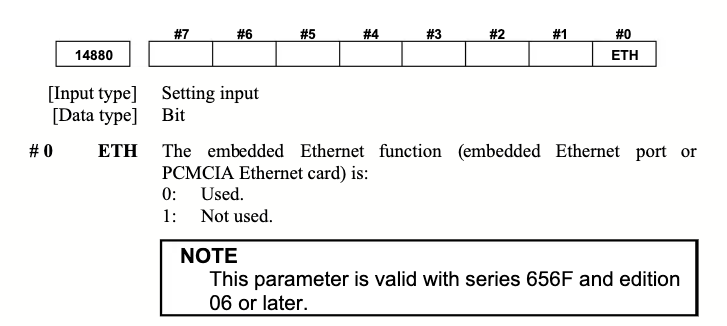
Note: This parameter is valid with series 656F and edition 06 or later.
Embedded Ethernet Port Selection — Parameter 14896 (300is/310is/320is Stand-Alone Only)
On stand-alone type 300is, 310is, and 320is controls, parameter 14896 determines which physical connector is used for the embedded Ethernet port and PCMCIA Ethernet card. Valid range: 0–3.
| Value | Embedded Ethernet Port | PCMCIA Ethernet Card |
|---|---|---|
| 0 | CD38A — port in the CNC (control unit) | Memory card slot on side of display unit |
| 1 | CD38A — port in the CNC (control unit) | Memory card slot in the CNC |
| 2 | CD38S — port on rear of display unit | Memory card slot on side of display unit |
| 3 | CD38S — port on rear of display unit | Memory card slot in the CNC |
In plain terms:
- Values 0 or 1 → plug your Ethernet cable into the CD38A port on the CNC/NCU (inside the electrical cabinet)
- Values 2 or 3 → plug your Ethernet cable into the CD38S port on the rear of the display/HMI unit
If you're not getting a FOCAS connection on a 300-series stand-alone control, check this parameter first — you may be plugged into the wrong physical port.
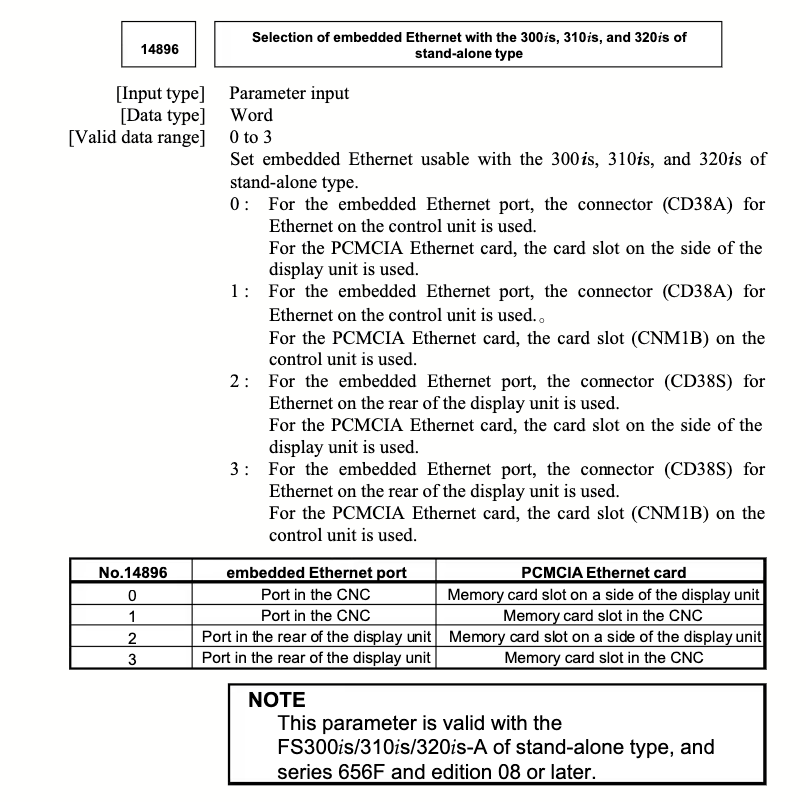
Note: This parameter is valid with the FS300is/310is/320is-A stand-alone type, series 656F and edition 08 or later.
Network Parameters:
- Located in EMBDD or ETHPRM menu
- IP Address, Subnet, Gateway
- FOCAS Port (typically 8193)
Part Counting Parameters:
- 6700#0 (PCM): Part count method (0 or 1)
- 6710: M-code used for part counting
- 6711: Current part count value (read-only)
Common Parameters:
- 3901: System part counter (macro variable)
- Ethernet-related parameters in 200-300 range
Parameter Safety
Before Changing Any Parameter:
- Document current value
- Understand what the parameter does
- Verify parameter isn't used by machine functions
- Have machine manual available
- Contact machine builder if unsure
After Changing Parameters:
- Reboot machine for changes to take effect
- Test thoroughly before production
- Document changes made
- Monitor machine behavior
Never:
- Change parameters you don't understand
- Modify servo or motion-related parameters without expert guidance
- Disable safety-related parameters
- Change parameters during production