Allen Bradley Connectivity
MachineMetrics connects to Allen Bradley PLCs using EtherNet/IP (Ethernet Industrial Protocol), a network protocol for industrial automation. Unlike a CNC control, a PLC has no standard set of data items — it exposes whatever tags the machine builder happened to program. That difference drives everything on these pages: you must identify the tags yourself and map them in an adapter script before any data appears.
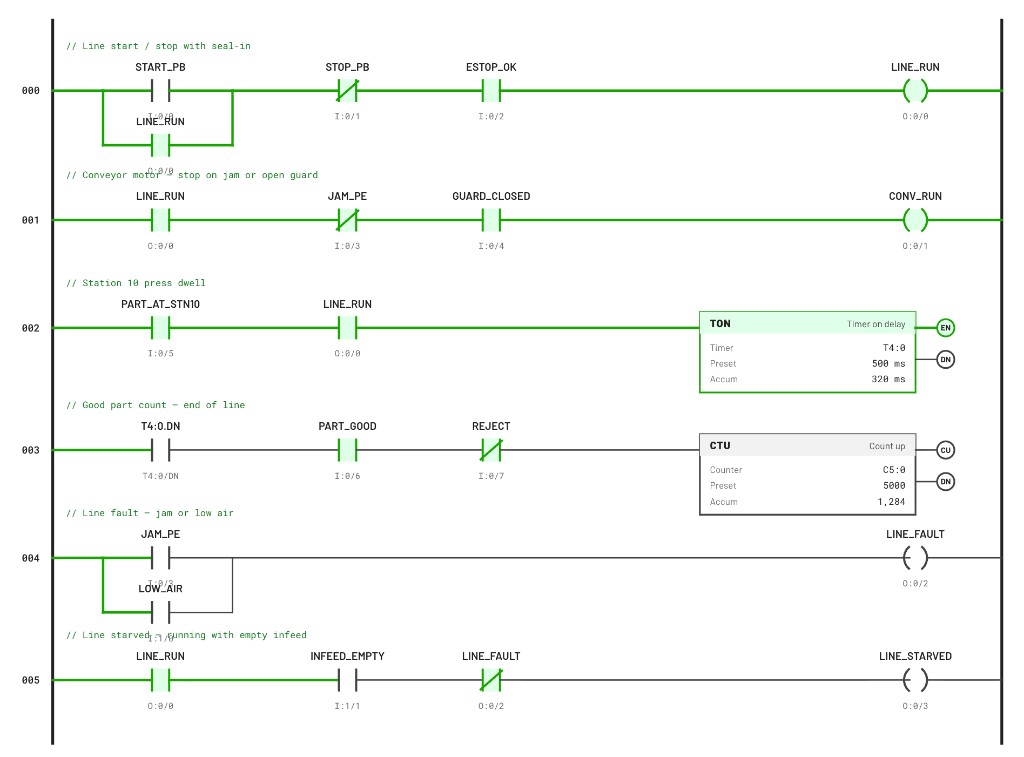
A typical PLC program. None of these names are standardized — the machine builder chose them. Here LINE_RUN is the execution signal, the CTU accumulator on rung 003 is the good part count, and LINE_FAULT and LINE_STARVED explain downtime. Locating the equivalents in your own program is the first step of an Allen Bradley connection.
Adding an Allen Bradley (EtherNet/IP) machine in MachineMetrics is only the setup step. You must implement an adapter script that maps PLC tags and memory to MachineMetrics data items. Without that mapping, the adapter cannot interpret your tags — the machine may show as added but will not report usable production data, which leads many customers to assume the connection is “broken.”
Tag / address mapping via an adapter script is mandatory before you will see data. See Script Example for setup steps and patterns. Contact MachineMetrics Support if you need more help.
How It Works
| Characteristic | Detail |
|---|---|
| Protocol | EtherNet/IP, based on the Common Industrial Protocol (CIP) |
| Transport | Standard Ethernet (TCP/IP) |
| Port | 44818 |
| Addressing | Tag-based, not register-based |
| Exchange | Real-time polling |
Important: the Allen Bradley adapter only works with CompactLogix, ControlLogix and GuardLogix controls. It does not support MicroLogix or SLC500 PLCs, which have their own dedicated adapters. See Compatible Controls before you start.
Prerequisites
- Allen Bradley CompactLogix, ControlLogix, or GuardLogix PLC
- IP address of controller
- List of tags to monitor (from PLC program or documentation)
- Backplane slot number (for ControlLogix/GuardLogix)
- Network access (TCP port 44818)
- EtherNet/IP scanner tool (for testing, optional)
In This Section
| Page | What it covers |
|---|---|
| Compatible Controls | Which controls are supported, which are not, and a per-model compatibility chart |
| Network Connection | Identifying the controller's Ethernet ports, choosing a connection method and verifying the link |
| Tags | Deciding which tags to collect, example tag sets by application, and the tag path formats the adapter accepts |
| Script Example | Adapter scripts for CompactLogix and ControlLogix/GuardLogix, and adding the machine in MachineMetrics |
| Troubleshooting | Path segment errors, wrong slot, connection timeouts and missing data |
Getting Help
Contact MachineMetrics Support or your Solution Delivery Manager (SDM). Include:
- Controller platform and catalog number (for example 5069-L310ER, 1756-L83E)
- IP address configured on the controller, and the backplane slot for ControlLogix/GuardLogix
- The list of tags you are trying to read, as they appear in the PLC program
- Adapter configuration (YAML) and screenshots of any error messages
Related Articles
- Adapter Scripts — Writing and testing adapter scripts
- Modbus/TCP Connectivity — Fallback for MicroLogix models
- Machine Settings — Configure data mapping and part counting
- Connectivity Overview — Compare connectivity methods across all machines
- Network Requirements — Firewall configuration
- Edge Device Setup — Edge device installation