IFM IO-Link Connectivity
IO-Link is for process data — pressure, temperature, flow, level, vibration, position — rather than the machine's own control data. Sensors plug into an IFM master block, and MachineMetrics reads the block over Ethernet.
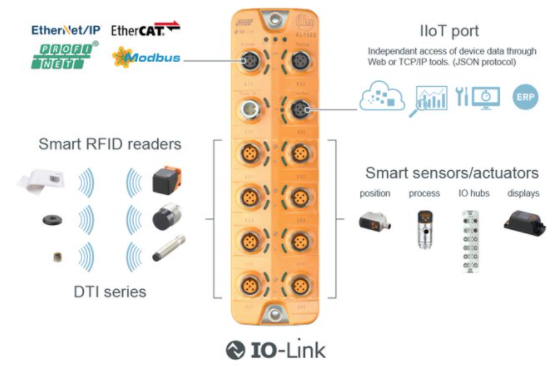
IFM IO-Link master block and sensors. MachineMetrics partners with IFM to connect IO-Link conforming sensors for temperature, pressure, flow, vibration, and other process data collection.
MachineMetrics partners with IFM to provide seamless connectivity to a wide range of IO-Link sensors for industrial data collection. This integration allows you to connect temperature sensors, pressure sensors, flow meters, vibration sensors, and many other smart sensors to capture real-time process data from your production environment.
Key Features:
- Connect any IO-Link conforming sensor to MachineMetrics
- Automatic sensor discovery and configuration
- Support for IFM IO-Link master blocks with IoT ports
- Real-time data collection from multiple sensors
- Cross-manufacturer sensor compatibility (IO-Link standard)
Partnership with IFM:
MachineMetrics has a strategic partnership with IFM to enable connectivity to their extensive portfolio of industrial sensors. All IFM IO-Link sensors are supported through this integration.
Connection Summary
The Edge device never talks to a sensor directly. Sensors plug into the IFM master block, and the Edge device talks to the master block over Ethernet.
- Where to plug in the cable: the master block's IoT port — a dedicated Ethernet port, separate from the fieldbus port used for EtherNet/IP or PROFINET. Only IFM blocks with an IoT port are supported, such as the AL1350 (8 sensor ports) and AL1352 (4 sensor ports). If the block has no IoT port, MachineMetrics cannot connect to it. Sensors themselves connect to the numbered IO-Link ports on the same block.
- What to set on the master block: a static IP address, subnet mask and gateway on the same subnet as the Edge device, configured through IFM's configuration software. See Network Configuration for the full walkthrough.
- What MachineMetrics asks for: the master block's IP address only. The IO-Link connector handles the port itself and then discovers the attached sensors automatically, so there is no port to enter and no adapter script to write.
What is IO-Link
IO-Link is an open industrial communication protocol standard (IEC 61131-9) that enables intelligent sensors and actuators to communicate with control systems and gateways.
Key Characteristics:
- Device Protocol: Standardizes data exchange between sensors and gateway devices (master blocks)
- Vendor Neutral: Sensors from different manufacturers are cross-compatible with any IO-Link master block
- Point-to-Point Communication: Each sensor connects to a port on the master block
- Bidirectional: Supports both data collection and sensor configuration
What IO-Link is NOT:
- ❌ NOT a data contextualization standard (like MTConnect)
- ❌ NOT a standardized communication protocol between master block and external applications
- ❌ Because of this, MachineMetrics support is limited to specific master blocks
How It Works:
- Sensors connect to individual ports on the IO-Link master block
- Master block communicates with sensors using IO-Link protocol
- Master block exposes sensor data via its own protocol (IoT, EtherNet/IP, Modbus, etc.)
- MachineMetrics Edge connects to the master block to collect sensor data
Supported Devices
Master Blocks
MachineMetrics currently supports:
✅ IFM Master Blocks with IoT Data Port
- IFM AL1350 (IO-Link master, 8 ports, IoT interface)
- IFM AL1352 (IO-Link master, 4 ports, IoT interface)
- Other IFM blocks with dedicated IoT ethernet port
Important Notes:
- ⚠️ Not all IFM blocks have an IoT port - Verify your master block model
- ❌ EtherNet/IP-based blocks cannot be supported via our EtherNet/IP integration
- ⚠️ Modbus-based blocks can be supported as a Modbus integration, but data must be unpacked manually (not recommended) - See Modbus TCP Guide
- 📝 Additional master block models may be supported in the future
Sensors
✅ All IO-Link Conforming Sensors
The integration supports any sensor that conforms to the IO-Link standard, including but not limited to:
IFM Sensors (Extensive Portfolio):
- Temperature sensors
- Pressure sensors
- Flow meters
- Level sensors
- Vibration monitoring sensors
- Position sensors
- Distance sensors
- Humidity sensors
- Photoelectric sensors
- Inductive proximity sensors
Other Manufacturers:
- Balluff sensors
- Sick sensors
- ifm electronic sensors
- Turck sensors
- Any IO-Link compliant sensor
Prerequisites
Before setting up IO-Link connectivity, ensure you have:
Hardware Requirements:
- IFM IO-Link master block with IoT port
- IO-Link sensors (IFM or other manufacturers)
- Network cable (Cat5e or Cat6) for master block
- MachineMetrics Edge device on the same network
- Appropriate M12 cables for sensor connections
Network Requirements:
- Available static IP address on your network
- Network switch or router with available port
- Ethernet access between Edge device and master block
Software Requirements:
- IFM's configuration software (for initial setup)
- Download from: https://www.ifm.com/us/en/category/095_010_010
- MachineMetrics account with IO-Link integration enabled
Access Requirements:
- Physical access to install master block and sensors
- Network configuration permissions
- Knowledge of sensor mounting locations
In This Section
| Page | What it covers |
|---|---|
| Sensor Catalog | The IFM master blocks and sensor families we have validated, with part numbers |
| Master Block Setup | Mounting and powering the block, setting its static IP, and configuring the sensor ports |
| Connecting Sensors | Planning measurement points, mounting sensors and running M12 cables |
| Data Collection | Adding the machine, automatic sensor discovery, the data item naming convention, and data mapping |
| Troubleshooting | Connection, sensor detection, data and master block faults |
Additional Resources
MachineMetrics Resources:
- Adapter Scripts - Advanced data transformation
- Machine Settings Guide - Configure data mapping
- Connectivity Overview - Compare connectivity methods
IFM Resources:
- IFM Website: https://www.ifm.com
- IFM Software Downloads: https://www.ifm.com/us/en/category/095_010_010
- IFM Sensor Catalog: https://www.ifm.com/us/en/products
- IO-Link Technology Overview: https://www.ifm.com/us/en/shared/technologies/io-link
IO-Link Standard:
- IO-Link Technology: https://io-link.com/
- IO-Link Specification: IEC 61131-9
- IODD File Repository: https://ioddfinder.io-link.com/
Related Guides:
- Edge Device Setup - Configure MachineMetrics Edge
- Network Requirements - Firewall configuration
Getting Help
MachineMetrics Support:
- Email: MachineMetrics Support
- Phone: 844-822-0664
Before Contacting Support:
- Note IFM master block model number
- Document connected sensor models and port numbers
- Verify network configuration (IP address, connectivity)
- Capture screenshots of IFM configuration software
- Note Vendor ID and Device ID for problematic sensors
- Check adapter logs in MachineMetrics
Information to Provide:
- IFM master block model and firmware version
- List of connected sensors (make, model, port number)
- Network configuration (IP address, subnet, gateway)
- Adapter configuration (YAML)
- Description of issue and troubleshooting steps taken
- Screenshots of IFM software showing sensor status
For IODD Issues:
- Provide Vendor ID and Device ID
- Note sensor manufacturer and model number
- Include sensor datasheet (if available)
- Describe expected vs actual data values