Data Mapping Tab
Configure how all incoming data items are labeled and used.
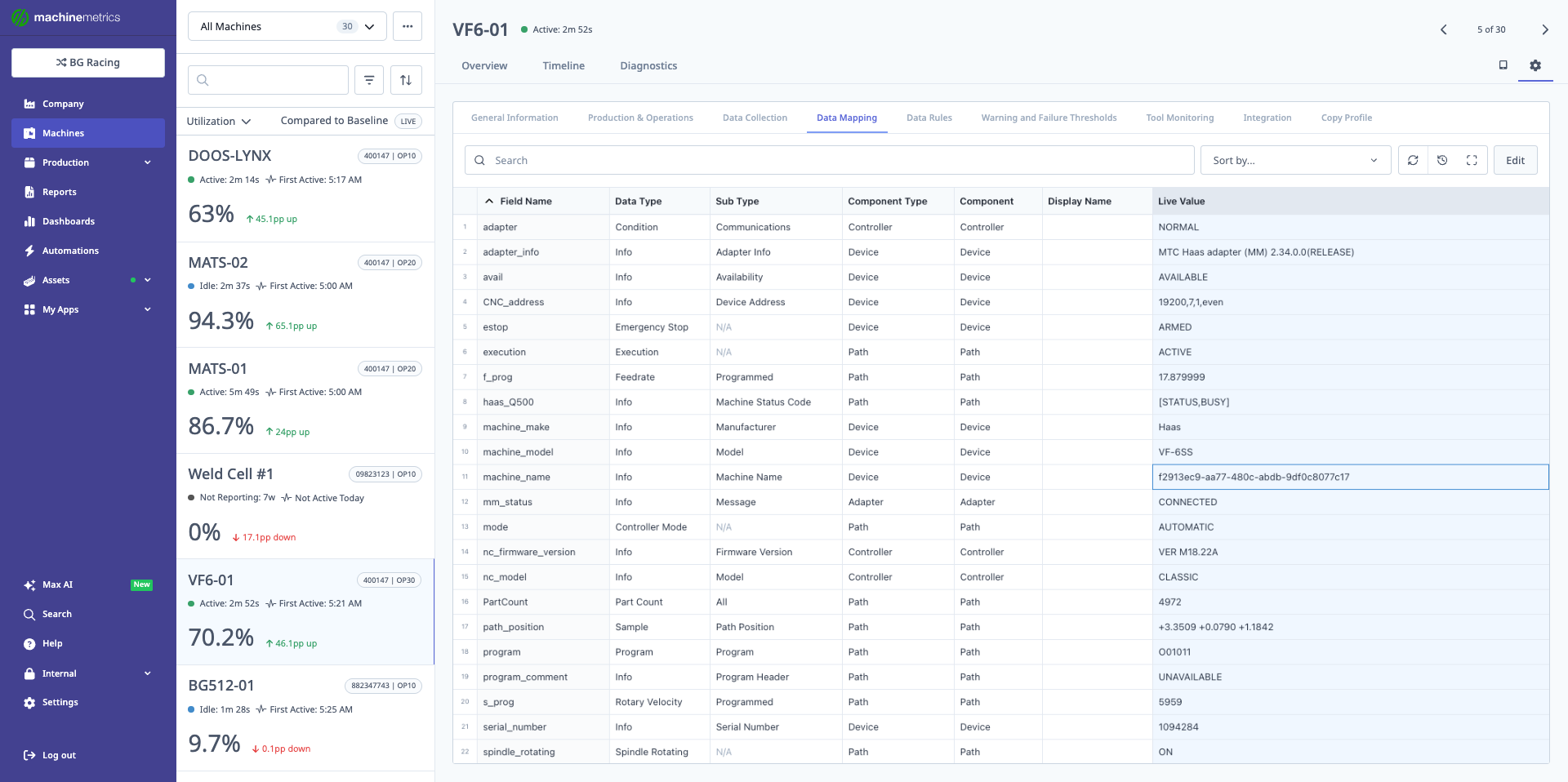
The Data Mapping tab displays all data items collected from the machine, showing field names, data types, sub types, component types, components, display names, and live values. This comprehensive view includes controller information, device details, and path data. You can search, sort, and edit data mappings to ensure all machine data is properly categorized and displayed.
Data Item Structure
The Data Mapping table shows:
-
Field Name
- Raw name from the machine or transform.
-
Data Type
-
Subtype
- Aids in organization and display in the Diagnostics tab.
-
Component / Component Type
- Indicates where the data belongs in the machine hierarchy.
Critical Mappings
For MachineMetrics features to work:
-
Program items:
- Must be mapped as
program. - Otherwise, they cannot be selected for program matching / APM Data Items on the Production & Operations tab (see APM).
- Must be mapped as
-
Part Count items:
- Must be mapped as
part count. - Otherwise, they cannot be used as:
- The data item for counting parts.
- Must be mapped as
-
Execution items:
- Must be mapped as
execution. - This supports:
- Running/idle states
- Utilization calculations
- Must be mapped as
Unmapped Data Items
- Any data item shown as unmapped:
- Will not be displayed.
- Will not be tracked in MachineMetrics.
Be sure to map all important signals, especially those required for production tracking and KPIs.
Editing, Importing, and Exporting Mapping
-
Edit Item:
- Use the Edit option to change:
- Data Type
- Subtype
- Component mapping
- Save changes to apply.
- Use the Edit option to change:
-
Export / Import:
- Export current mappings to a file.
- Modify them externally (or generate via AI).
- Re-import the mapping file.
Typical workflow with PLCs:
- Export PLC tags (e.g., from Allen Bradley).
- Use an AI (e.g., Claude) to generate a MachineMetrics mapping file.
- Import the file to quickly set up mapping.
Step 2 sends your data outside MachineMetrics. A PLC tag export is not just field names — tag and program naming often reveals part numbers, customer names, process parameters, and plant layout.
Before using an external AI service for this, confirm that it fits your organization's data-handling policy and that your agreement with that provider covers production data. Anything you paste or upload is processed under your agreement with them, not under your MachineMetrics agreement.
If you would rather not send tags externally, map the items manually in this tab, or contact MachineMetrics Support for help with a large mapping. See Your responsibilities when connecting an assistant for the equivalent guidance on AI assistants.