Network Requirements
This document outlines all network requirements for MachineMetrics deployment, including firewall rules, required ports, domains, bandwidth, and network architecture options.
- Overview
- Network Architecture Options
- Firewall Requirements
- NATS IP Addresses
- DNS Configuration
- NTP Configuration
- Machine Protocol Ports
- MAC Address OUIs for MachineMetrics Hardware
- Bandwidth Requirements
- Deep Packet Inspection (DPI)
- Proxy Configuration
- Troubleshooting
- Network Checklist
- Related Articles
Overview
MachineMetrics Edge devices, including virtual Edge devices, provide no terminal, shell, or SSH access and no interactive login. This is a deliberate security-hardening measure: the Edge has no OS-level access and no user accounts, which minimizes its attack surface (see Edge Device Security). Because there is no shell on the Edge, run connectivity checks from a computer on the same network, or use the built-in Diagnostics (Firewall Test and Manual Ping) in Edge Management.
MachineMetrics Edge devices require:
- Internet connectivity — to communicate with MachineMetrics cloud
- Machine network access — to collect data from your equipment
All communication is edge-initiated outbound. There are no inbound firewall requirements.
Network Architecture Options
The MachineMetrics Edge device has two network interfaces (NICs) that can be configured for various network topologies.
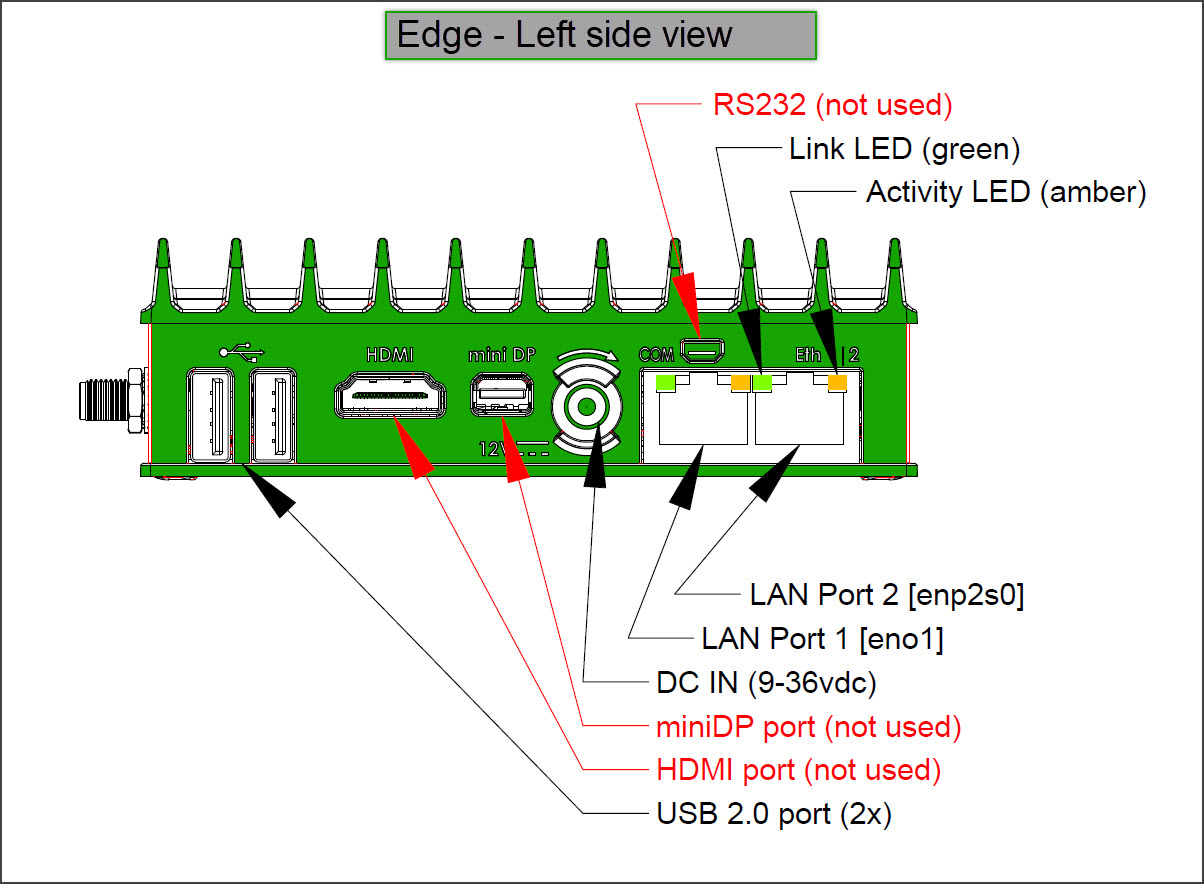
MachineMetrics Edge Device showing dual Ethernet ports (LAN Port 1 and LAN Port 2) and other connectivity options. The dual-NIC design enables secure network isolation between machine networks and corporate/internet networks.
Edge Network Interface Configuration
| Interface | Purpose | IP Configuration | Typical Use |
|---|---|---|---|
| LAN Port 1 (eno1) | Machine Network | Static IP required | Connect to machines via switch/VLAN |
| LAN Port 2 (enp2s0) | Company/Internet Network | DHCP or Static | Connect to corporate network or internet |
Important: The machine network interface (LAN Port 1) must use a static IP address to ensure consistent connectivity to machines. The company network interface (LAN Port 2) can use DHCP when network isolation is configured.
When you assign a static IP (rather than using DHCP), only enter a gateway address on the connection that is internet-facing.
- LAN Port 2 (company/internet network) — enter the gateway here, or let DHCP supply it.
- LAN Port 1 (machine network) — leave the gateway blank. This interface is not internet-facing.
- WiFi — when WiFi provides the internet connection, the gateway belongs to the WiFi configuration and both Ethernet ports must be left blank.
A gateway on a non-internet-facing interface can pull outbound traffic away from the real internet path, causing the Edge device to lose cloud connectivity or stop collecting data.
Option 1: Company Network (Single Interface)
Best for facilities with a single converged network where machines and internet are on the same network.
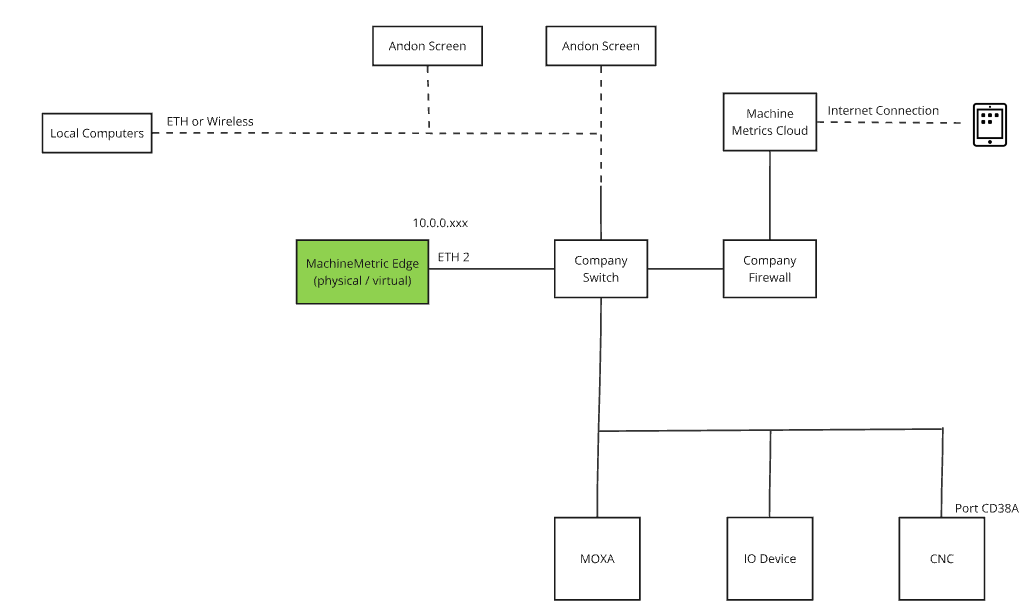
Configuration:
- Single Ethernet connection to company network
- Edge device uses DHCP or static IP
- Machines and internet accessible on same network
Requirements:
- Network drops (CAT5/CAT6) at each machine
- Firewall allows outbound ports 443, 7422, 53, 123
Option 2: Isolated Networks (Dual Interface - Recommended)
Best for maximum security - keeps machine network completely isolated from corporate network and internet.
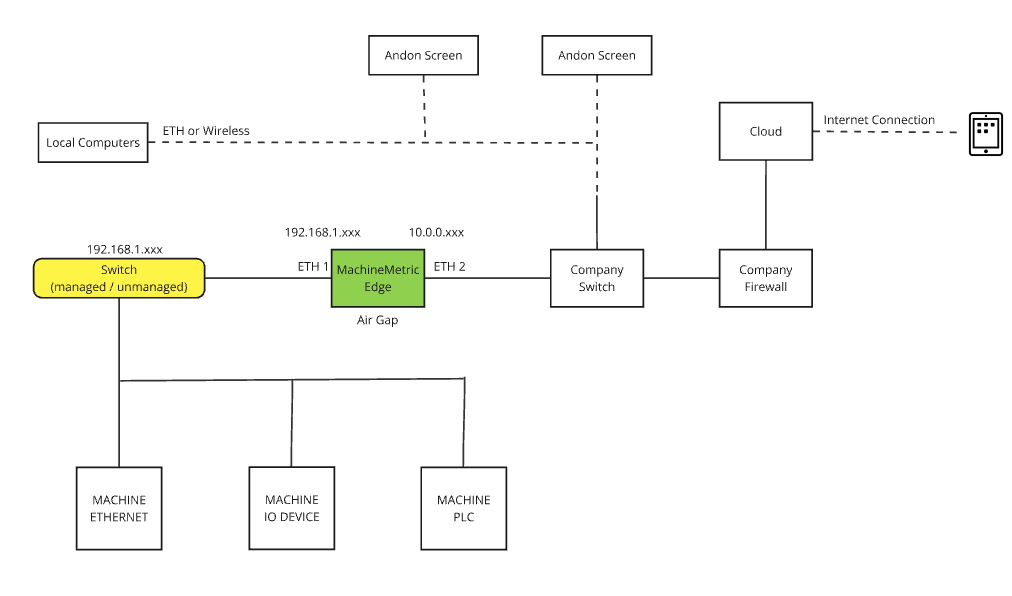
Configuration:
- LAN Port 1 (eno1): Connected to isolated machine network (static IP required)
- LAN Port 2 (enp2s0): Connected to company network with internet access (DHCP or static)
- Machines have no internet access
- Edge acts as secure bridge
Benefits:
- Machines stay isolated from internet (zero attack surface)
- Reduced cybersecurity risk for OT equipment
- Edge device provides secure data conduit
- Compliant with OT security best practices
Requirements:
- Two network connections at Edge location
- Machine network switch/VLAN (no internet access)
- Company network connection with internet access
Option 3: Wireless LAN
Best for flexibility when running Ethernet cables to machines is impractical, but corporate WiFi is available.
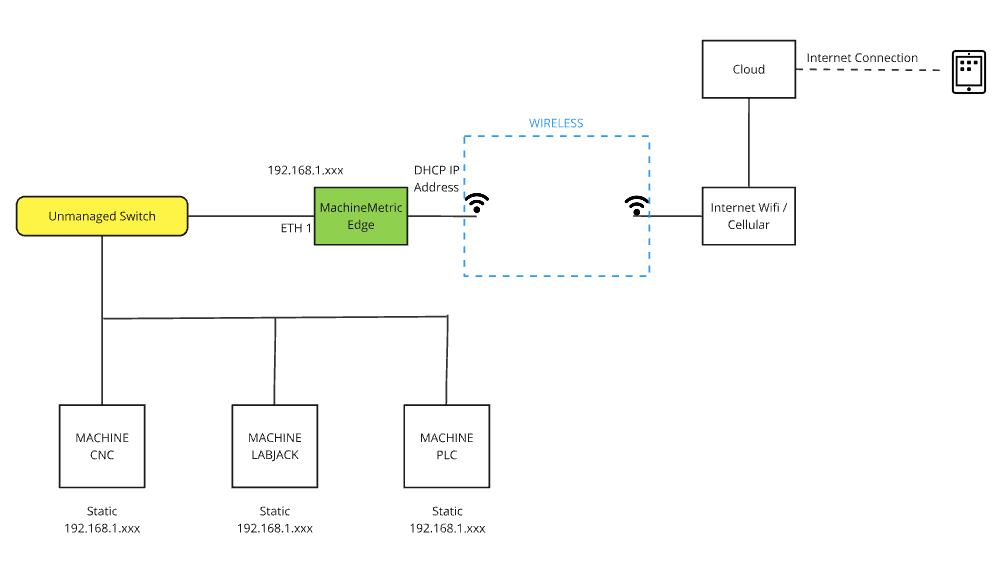
Configuration:
- Machines connect via Ethernet to Edge device
- Edge connects to corporate network via WiFi
- Single wireless connection provides internet access
Requirements:
- WiFi-enabled Edge device
- Reliable WiFi coverage on shop floor
- WPA2/WPA3 encrypted wireless network
Option 4: Fully Wireless
Best for flexibility when WiFi is available but running Ethernet cables to each machine is impractical. The Edge device acts as a wireless bridge.
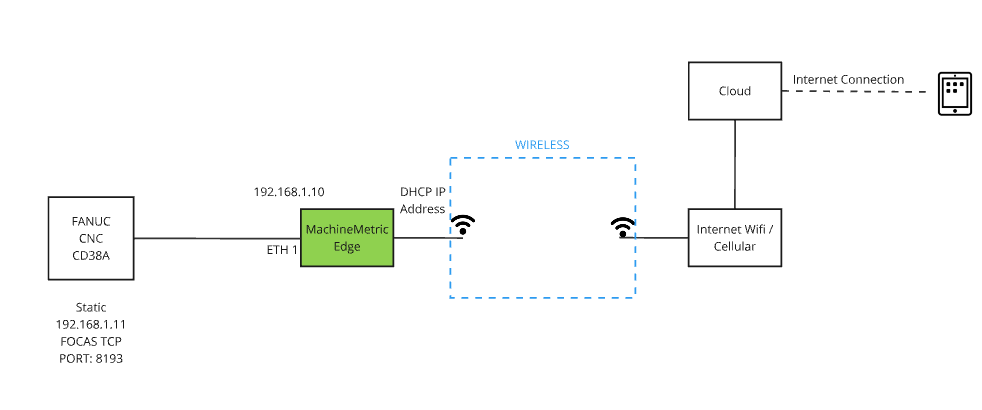
Configuration:
- Machines connect to Edge via standard Ethernet (wired LAN devices)
- Edge device connects to corporate WiFi network
- Edge acts as wireless bridge between wired machines and WiFi network
Requirements:
- WiFi-enabled Edge device
- Standard Ethernet connectivity from machines to Edge
- Strong WiFi signal at Edge location
- WPA2/WPA3 encrypted wireless network
Note: No wireless I/O modules required. Machines use standard Ethernet connections to the Edge, and the Edge provides the wireless connectivity to the network.
Option 5: Cellular Network
⚠️ Use at your own risk - least preferred option
Best for remote locations without reliable internet, but comes with limitations and risks.
Configuration:
- Edge device connects via cellular modem
- Machines connect to Edge via Ethernet
- No dependency on corporate network
Requirements:
- Cellular modem (e.g., Cradlepoint)
- Cellular data plan with sufficient bandwidth
- Good cellular signal strength
Limitations & Risks:
- Higher latency than wired connections
- Variable bandwidth and reliability
- Potential data caps and overage charges
- Signal interruptions can cause data gaps
- No MachineMetrics support for cellular connectivity issues
- Customer responsible for cellular infrastructure
Important: Cellular connectivity is not officially supported by MachineMetrics. Use only when no other network option is available, and understand that connectivity issues related to cellular networks are the customer's responsibility.
Firewall Requirements
Required Outbound Ports
| Port | Protocol | Description |
|---|---|---|
| 53 | UDP | DNS resolution |
| 123 | UDP | Network Time Protocol (NTP) |
| 443 | TCP | HTTPS — all cloud communication |
| 7422 | TCP | NATS — tool monitoring and Edge health |
Required Domains (Standard Cloud)
| Domain | Purpose |
|---|---|
api.machinemetrics.com | API communication |
app.machinemetrics.com | Web application |
*.balena-cloud.com | Software updates |
cloudlink.balena-cloud.com | Remote diagnostics, OS updates, OpenVPN tunnel (activation, heartbeat, remote access) |
notify.bugsnag.com | Error reporting |
mm-adapter-store.s3.us-west-2.amazonaws.com | Adapter scripts |
mm-edge-uploads.s3.us-west-2.amazonaws.com | Data uploads |
machinemetrics-deploy.s3.us-west-2.amazonaws.com | Deployment artifacts |
machinemetrics-public.s3.us-west-2.amazonaws.com | Public resources |
352302322568.dkr.ecr.us-west-2.amazonaws.com | Container updates |
prod-us-west-2-starport-layer-bucket.s3.us-west-2.amazonaws.com | Container layers |
Required Domains (GovCloud)
| Domain | Purpose | Static IPs |
|---|---|---|
api.machinemetrics-us-gov.com | API communication | 18.252.129.108, 18.254.70.116, 182.30.131.220 |
app.machinemetrics-us-gov.com | Web application | — |
stream.machinemetrics-us-gov.com:7422 | NATS | See NATS IPs below |
api.balena.machinemetrics-us-gov.com | Updates | 18.253.182.20 |
ca.balena.machinemetrics-us-gov.com | Updates | 18.253.182.20 |
cloudlink.balena.machinemetrics-us-gov.com | Diagnostics | 18.253.182.20 |
logs.balena.machinemetrics-us-gov.com | Updates | 18.253.182.20 |
ocsp.balena.machinemetrics-us-gov.com | Updates | 18.253.182.20 |
registry2.balena.machinemetrics-us-gov.com | Updates | 18.253.182.20 |
s3.balena.machinemetrics-us-gov.com | Updates | 18.253.182.20 |
tunnel.balena.machinemetrics-us-gov.com | Updates | 18.253.182.20 |
machinemetrics-adapter-store.s3.us-gov-east-1.amazonaws.com | Adapters | — |
machinemetrics-govcloud-edge-uploads.s3.us-gov-east-1.amazonaws.com | Uploads | — |
machinemetrics-deploy.s3.us-gov-east-1.amazonaws.com | Deployment | — |
machinemetrics-govcloud-public.s3.us-gov-east-1.amazonaws.com | Public | — |
139811071765.dkr.ecr.us-gov-east-1.amazonaws.com | Containers | — |
NATS IP Addresses
NATS is used for tool monitoring and Edge health telemetry on port 7422.
Standard Cloud
- 54.218.103.126
- 52.24.16.63
- 52.34.161.223
- 35.155.82.103
GovCloud
- 18.252.129.108
- 18.254.70.116
- 182.30.131.220
DNS Configuration
The Edge device uses Google DNS by default:
- Primary:
8.8.8.8 - Secondary:
8.8.4.4
DNS can be overridden via:
- DHCP configuration
- Static configuration in Edge management
If Google DNS is blocked, the Edge falls back to configured DNS servers.
NTP Configuration
The Edge synchronizes time using the pool.ntp.org fleet:
*.resinio.pool.ntp.org
Internal NTP servers can be specified via DHCP if required.
Note: IP-based filtering is not possible for NTP due to the distributed nature of public NTP pools.
Machine Protocol Ports
If a firewall exists between the Edge device and machines, allow outbound access from the Edge to these ports:
| Protocol / Controller | Port |
|---|---|
| Allen Bradley (EtherNet/IP) | 44818 |
| FANUC FOCAS | 8193 |
| MTConnect Adapter | 7878 |
| MTConnect Agent | 5000 |
| Haas Serial (via Moxa) | 4001 |
| Haas MTConnect | 8082 |
| Citizen M700 | 683 |
| Mitsubishi | 683 |
| Heidenhain | 19000 |
| Siemens OPC-UA | 4840 |
| Kepware OPC-UA | 49320 |
| Bystronic OPC-UA | 56000 |
| Fanuc Robot OPC-UA | 4880 |
| Modbus TCP / SeaLevel | 502 |
MAC Address OUIs for MachineMetrics Hardware
IT teams often need to identify MachineMetrics hardware on their network, whether for NAC or 802.1X enrollment, MAC-based ACLs, DHCP reservations, or simply picking our devices out of a large ARP table. The first three octets of a MAC address are the Organizationally Unique Identifier (OUI), an IEEE-assigned block that identifies the hardware manufacturer.
Below are the registered IEEE blocks for the hardware vendors used in MachineMetrics deployments.
Edge Compute Hardware
| Vendor | Registered OUI(s) | Notes |
|---|---|---|
| OnLogic | 30:CB:89 | Current OnLogic entity |
| Logic Supply | 84:8B:CD:4 | MA-M block, appears as 84:8B:CD:4x:xx:xx. Pre-rename OnLogic entity, may appear on older units |
| CompuLab (Fitlet) | 00:01:C0 | Fitlet hardware is manufactured by CompuLab, Ltd. There is no separate Fitlet registration |
| Advantech | 00:D0:C9, 74:FE:48 | Advantech Co., Ltd. (Taiwan) |
| Advantech (regional entities) | 00:0B:AB, 28:87:AF, C4:00:AD, CC:82:7F, C4:B1:6B, 00:14:53, 00:0E:02 | China, Czech, Korea, and Canada entities |
On x86 Edge compute units, the burned-in MAC address frequently belongs to the network interface controller vendor rather than the system integrator. Depending on how the unit was manufactured, an OnLogic, Fitlet, or Advantech Edge device may present an Intel or Realtek OUI instead of the vendor OUI above. Use the vendor OUIs as a primary filter, but expect Intel and Realtek prefixes as well. To confirm which prefixes are in use at a specific site, read the MAC addresses directly from the deployed devices.
I/O and Data Acquisition Hardware
| Vendor | Registered OUI | Typical Use |
|---|---|---|
| Sealevel Systems | 00:0A:0B | Ethernet I/O modules (Modbus TCP, port 502) |
| LabJack | 90:2E:87 | LabJack T-series DAQ, including the T4 and T7 |
These are purpose-built network devices and reliably present their own vendor OUI.
Note on the LabJack T4 and T7: Both models have a 10/100Base-T RJ45 port used for Modbus TCP communication, but power must still be supplied through the USB connector. Neither model supports Power over Ethernet.
Which Network Will These Devices Appear On?
In the recommended dual-interface isolated topology (see Option 2: Isolated Networks), machine-side hardware such as Sealevel I/O modules and LabJack DAQ units sits on the isolated machine network, not the corporate network. Only the Edge device's company-network interface (LAN Port 2) is visible from the corporate side.
If your IT team is searching the corporate network for MachineMetrics hardware and only finds the Edge devices, this is expected behavior. Machine-side hardware must be enumerated from the machine VLAN.
Verifying an Unknown OUI
To confirm a manufacturer from a MAC address you have found on your network, look up the first three octets in the IEEE Registration Authority public listing at standards-oui.ieee.org, or use any OUI lookup tool that references the IEEE database.
Bandwidth Requirements
MachineMetrics has minimal bandwidth requirements:
Upload (Edge to Cloud)
| Machine Type | Bandwidth |
|---|---|
| Standard machine | ~1 kbps |
| High-data machine (FANUC FOCAS) | ~5 kbps |
Download (Cloud to Browser)
| View | Bandwidth |
|---|---|
| Dashboard | ~250 bps per machine |
| Workcenter View | ~2 kbps (assumes 1 part/min) |
Example: A facility with 50 machines needs approximately:
- Upload: 50-250 kbps
- Download: 12.5-100 kbps
Deep Packet Inspection (DPI)
Deep packet inspection must NOT be applied to traffic between the Edge device and MachineMetrics cloud.
Exempt the following from DPI:
- All MachineMetrics domains
- All Balena domains (including CloudLink/OpenVPN tunnel to
cloudlink.balena-cloud.com) - S3 endpoints
- NATS services
- All encrypted HTTPS traffic
If DPI is enabled (Palo Alto, Fortinet, Cisco, etc.), create bypass rules for Edge traffic. DPI can disrupt the OpenVPN tunnel used by CloudLink.
Proxy Configuration
If your network requires a proxy:
- Configure proxy settings during Edge device activation
- Or update via the Edge management interface
The Edge supports HTTP/HTTPS proxy with optional authentication.
Troubleshooting
Edge Device Not Connecting
- Verify internet connectivity from the Edge location
- Check that required ports (443, 7422) are open
- Confirm required domains are accessible
- Check for DPI interference
- Verify DNS resolution is working
CloudLink Blocked (No Heartbeat, Updates Stuck, Activation Fails)
Problem: Edge device shows offline, cannot activate, does not receive software updates, or MachineMetrics support cannot access the device remotely. The Edge may appear to have internet access (can ping external IPs) but still fails to connect to MachineMetrics.
What is CloudLink?
CloudLink is the service that maintains a persistent connection between the Edge device and the MachineMetrics cloud. It uses OpenVPN to establish an outbound secure tunnel over TCP port 443 to cloudlink.balena-cloud.com. The Edge device initiates this connection — there are no inbound connections. Through this tunnel, CloudLink enables:
- Device activation and registration
- Software and OS updates
- Remote diagnostics and support access
- Heartbeat/health telemetry (visible as "Last Seen" in the portal)
Root Cause: The domain cloudlink.balena-cloud.com (port 443) is blocked by a firewall, or traffic to it is being intercepted or dropped. This is the most common cause of Edge connectivity failures. Some firewalls or security appliances block or inspect VPN/OpenVPN traffic — ensure CloudLink traffic is not caught by VPN-blocking rules or deep packet inspection (DPI).
Symptoms:
- Edge device stuck on activation screen or shows offline in portal
- Software updates never arrive
- MachineMetrics support cannot remotely access the device
- Connection errors such as
ECONNRESETin Edge logs - Edge appears to have internet access but does not report a heartbeat
Important — Check All Firewalls:
Many facilities have multiple firewall layers (e.g., an OT/plant-floor firewall and a corporate/enterprise edge firewall). Both must allow the required domains. A common failure is the OT firewall being correctly configured while the corporate firewall still blocks cloudlink.balena-cloud.com.
Diagnostic Steps:
-
Verify CloudLink is reachable from a computer on the same network as the Edge device:
curl -v https://cloudlink.balena-cloud.com/ping- Success: Returns a response (HTTP 200 or similar)
- Failure: Connection refused, timeout, or
ECONNRESET— CloudLink is blocked
-
Verify MachineMetrics API is reachable:
curl -v https://api.machinemetrics.com/ping -
Verify DNS resolution:
dig cloudlink.balena-cloud.comor
nslookup cloudlink.balena-cloud.com- If DNS fails, outbound UDP port 53 may be blocked, or DNS servers are unreachable
-
Verify basic internet access:
ping 8.8.8.8- If ping succeeds but curl to CloudLink fails, a firewall is specifically blocking the domain
-
Check CloudLink heartbeat in MachineMetrics:
- Log into MachineMetrics → Assets → Edge Devices
- Select the Edge device
- If status shows Not Reporting and "Last Seen" is stale, CloudLink is not reaching the cloud
Resolution:
Work with your IT team to:
-
Whitelist
cloudlink.balena-cloud.comon all firewalls between the Edge device and the internet (both OT and corporate/enterprise firewalls). Ensure outbound TCP port 443 is allowed to this domain. -
Exempt CloudLink from VPN-blocking rules — If your network blocks or restricts VPN traffic (including OpenVPN), add an exception for
cloudlink.balena-cloud.com. The Edge requires this OpenVPN tunnel to function. -
Exempt from DPI — Deep packet inspection can interfere with OpenVPN traffic. Ensure MachineMetrics and Balena domains are excluded from DPI (see Deep Packet Inspection above).
For the complete list of required domains, see Required Domains (Standard Cloud) above.
After updating firewall rules, restart the Edge device and verify the heartbeat returns in the MachineMetrics portal.
Machines Not Reporting Data
- Verify local network connectivity between Edge and machines
- Check machine protocol ports are accessible
- Confirm machine IP addresses are correct in MachineMetrics
- Check for VLAN or switch configuration issues
Intermittent Connectivity
- Check for network congestion
- Verify WiFi signal strength (if wireless)
- Review firewall logs for blocked traffic
- Check NTP synchronization
Network Checklist
Before deployment, verify:
- Outbound ports 53, 123, 443, 7422 are open
- Required domains are accessible (or whitelisted)
- DPI is disabled for MachineMetrics traffic
- Machine network is accessible from Edge device location
- Bandwidth is sufficient for number of machines
- DNS resolution is working
- NTP synchronization is available
Related Articles
- Security Overview — Certifications, compliance, authentication
- Data Handling & Privacy — Edge security, data retention