Citizen Firmware Check
Check the firmware before anything else. Below the minimum version the control will not serve data reliably, and no amount of network configuration will fix it.
Minimum Firmware Versions
Before configuring your control for communication with MachineMetrics, the Mitsubishi NCU firmware on the machine must be at or above the minimum version listed in the table below. You must contact your Citizen machine vendor to arrange this update — do not attempt to update the firmware yourself.
The table below shows, for each family, the MINIMUM NC-MAIN version recommended on a control to avoid any compatibility issues:
| Model | Minimum Recommended NC-MAIN |
|---|---|
| A32 | AE |
| K16E | EM |
| L12 | EP |
| L720 | B5 |
| L20E IX | EU |
| L20X | EM |
| L220 | EQ |
| L32 | EQ |
| M4xx | EU |
⚠️ WARNING: Connecting the machine to MachineMetrics without the minimum recommended NC-MAIN firmware version may cause the machine to alarm.
How to Check Firmware Version
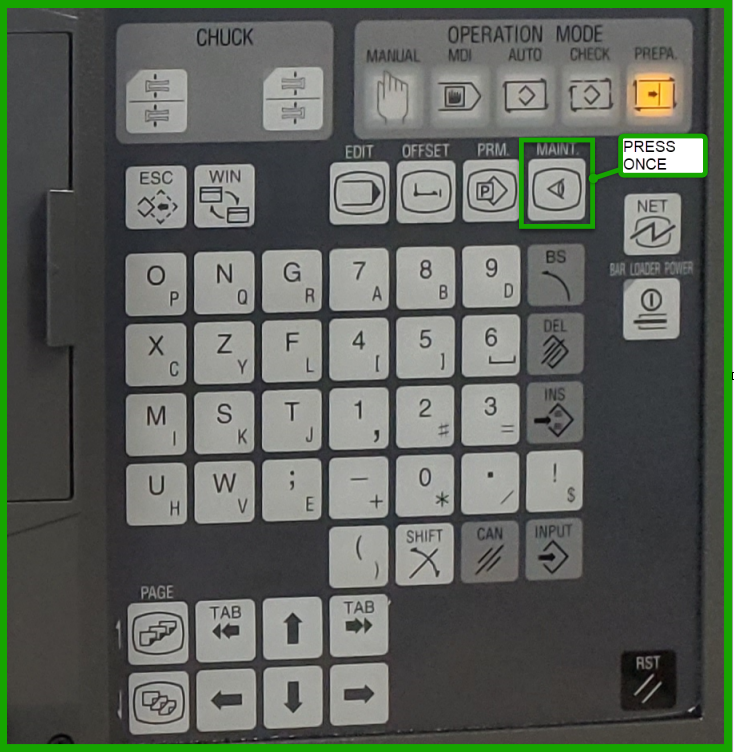
Step 1: Access Software List
Press the MAINT hardkey on the control panel.
Note: Hardkey buttons may vary depending on model of the machine.
Step 2: View Software List
Press the S/W LIST softkey.
Step 3: Verify NC-MAIN Version
Check the NC-MAIN firmware version (firmware P/N) on the screen.
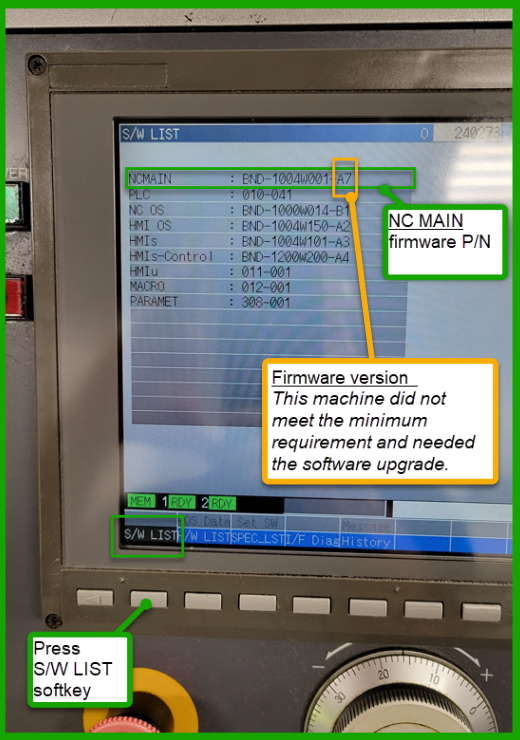
Compare the version shown to the minimum recommended version in the table above.
If the firmware meets the minimum requirements: Proceed to Network Configuration.
If the firmware does NOT meet the minimum requirements, follow this escalation path to get the firmware updated:
-
Contact your Citizen machine vendor first. Reach out to the distributor or dealer who sold or services the machine and request a firmware upgrade to the minimum NC-MAIN version for your model. This is the standard path and should be your first call.
-
If your vendor is unable to help, contact Citizen directly. Many customers have successfully resolved firmware update issues by going directly to Citizen Machinery. This is a well-established path — Citizen has handled these requests before and can coordinate the update even when local vendors cannot.
- Citizen Machinery Americas: www.citizenmachinery.com
- Reference your machine model, serial number, and the minimum NC-MAIN version required.
Although Citizen machines use a Mitsubishi NCU, firmware updates for Citizen machines are not supported by Mitsubishi directly. Contacting Mitsubishi will not result in a firmware update for your Citizen machine. Always go through Citizen or your Citizen vendor.
⚠️ WARNING: Connecting the machine to MachineMetrics without the minimum recommended NC-MAIN firmware version may cause the machine to alarm.