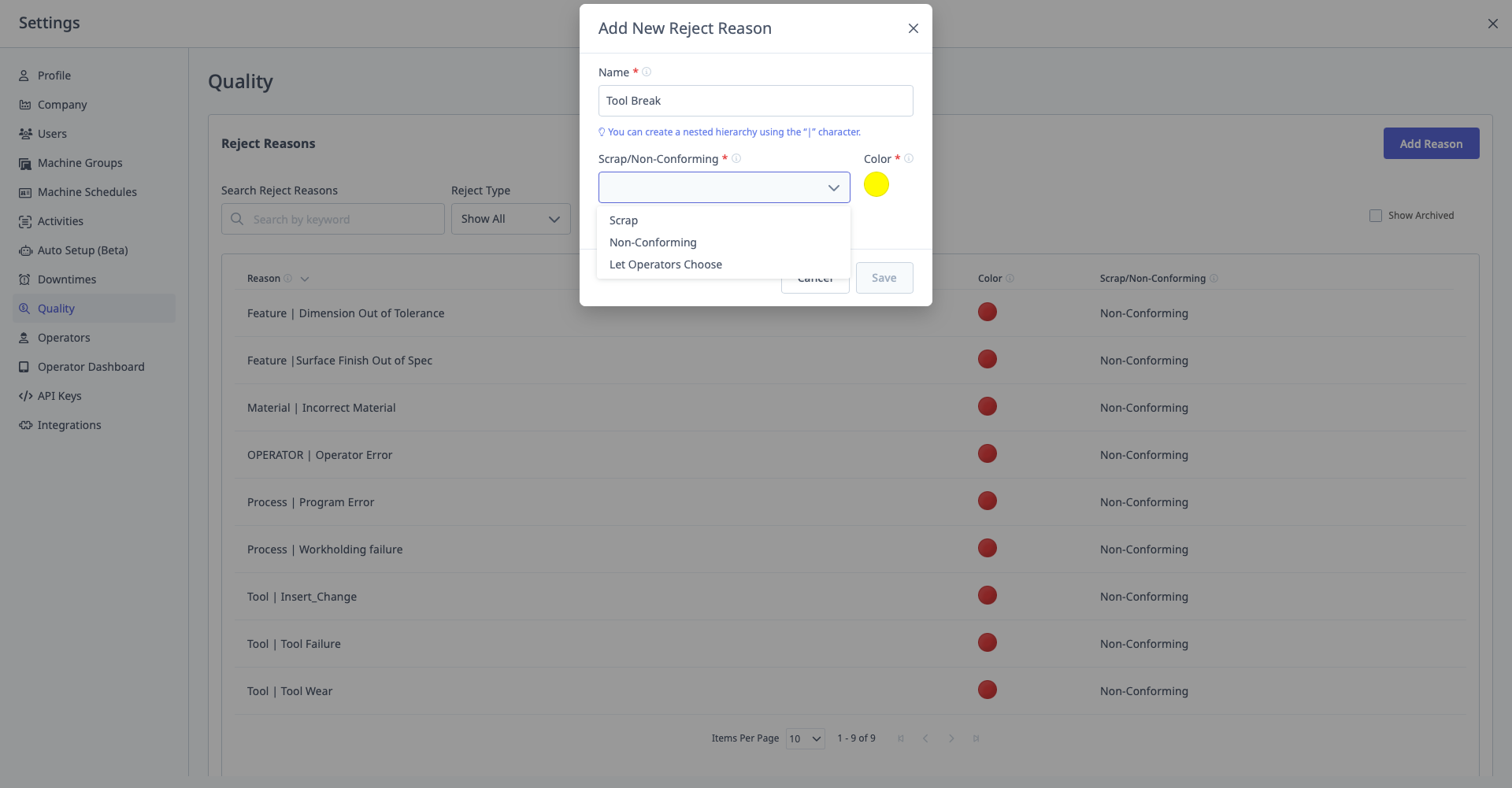
Quality
What is Quality?
Quality is where you configure reject reasons (why parts are rejected).
Access: Settings → Quality
Who Can Manage: Managers, Executives, IT Admins
Purpose of Reject Reasons
Why Define Reject Reasons:
- Track why parts are rejected
- Root cause analysis (Pareto charts)
- Identify quality improvement opportunities
- Calculate Quality component of OEE
See Also: Quality Guide for comprehensive guide
For Auto Reject Rules: Reject reasons configured here are used in the Auto Reject Rules feature in Labs to automatically map machine reject data items to quality categories. See Labs Guide - Auto Reject Rules for configuration details.
Creating Reject Reasons
Step-by-Step:
- Navigate to Settings → Quality → Reject Reasons
- Click "Add Reason"
- Enter Reason Name
- Select Scrap/Non-Conforming Behavior:
- Scrap or Non-Conforming: Operator chooses
- Scrap: Always marked as scrap
- Non-Conforming: Always marked as non-conforming
- Select Color (for visual identification)
- Click "Save"
Creating Hierarchical Reject Reasons
Format: Same as downtime categories, use pipe (|) separator
Example:
Parent: Dimensional
Child: Dimensional | Out of Specification
Grandchild: Dimensional | Out of Specification | Groove | Diameter Big
Steps:
- Create parent:
Dimensional - Create child:
Dimensional | Out of Specification - Create grandchild:
Dimensional | Out of Specification | Groove - Create great-grandchild:
Dimensional | Out of Specification | Groove | Diameter Big
Operator View: On tablets, reject reasons appear nested for easy selection.
Scrap vs. Non-Conforming
Scrap:
- Part is unusable
- Cannot be reworked
- Total loss
Non-Conforming:
- Part is outside spec but may be reworked
- Or used with deviation approval
- Potential recovery
Configuration:
- Set behavior when creating reject reason
- Or let operator choose (Scrap or Non-Conforming)
Colors
Purpose: Visual identification in reports and dashboards.
Operator View: Colors appear on:
- Operator Dashboard (tablet)
- Quality reports
- OEE Quality component visualization
Best Practices
Specific Reject Reasons:
- Avoid generic "Quality Issues"
- Use hierarchy:
Dimensional | Out of Spec | Feature X | Too Large - Specific reasons enable targeted improvements
Example Hierarchy:
Dimensional
  ├─ Out of Specification
  │   ├─ Groove
  │   │   ├─ Diameter Big
  │   │   └─ Diameter Small
  │   └─ Drill
  │       ├─ Hole Size Big
  │       └─ Hole Size Small
  └─ Surface Finish
      ├─ Rough Surface
      └─ Scratches

Tooling Issues
  ├─ Dull Tool
  ├─ Tool Break
  └─ Wrong Tool