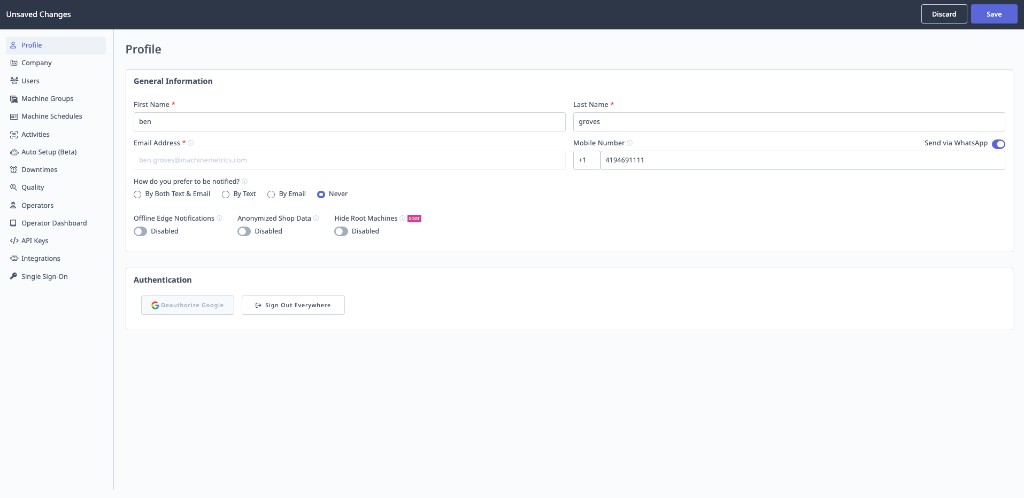
Profile Settings
What is Profile?
Profile contains your personal user settings, including notification preferences and working hours.
Access: Settings → Profile
Mobile Number
Purpose: Receive text or WhatsApp notifications from workflows and alerts.
Configuration:
- Enter your mobile number (with country code)
- Format:
+1-555-123-4567 - Toggle Send via WhatsApp to receive notifications through WhatsApp instead of SMS text
- Click Save
Use Case: Receive urgent alerts via text or WhatsApp when workflows trigger. If you prefer WhatsApp over SMS, enable the Send via WhatsApp toggle next to your mobile number — notifications will be delivered to the WhatsApp account associated with that number.
Notification Preferences
How You Prefer to Be Notified: Configure how workflows and alerts reach you.
Options:
- Email: Receive notifications via email only
- Text: Receive notifications via text message only
- Email and Text: Receive notifications via both methods
- Never: Do not receive notifications
Important: By default, notification preference is set to Never. If you're not receiving workflow notifications, check this setting first.
Configuration:
- Select preferred notification method from dropdown
- Click Save
Notification Schedule
Purpose: Specify when you want to receive notifications (avoid off-hours alerts).
Configuration:
- Click Add Schedule
- Select days of week (e.g., Monday - Friday)
- Set start time (e.g., 9:00 AM)
- Set end time (e.g., 5:00 PM)
- Click Save
Example:
Working Hours: Monday - Friday, 9:00 AM - 5:00 PM
Result: Notifications only sent during these hours
Multiple Schedules:
- Add multiple schedules for different days or shifts
- Example: Monday-Friday 9-5, Saturday 8-12
Override: Workflow creators can choose to override notification times for critical alerts (sent at any time regardless of your schedule).