Hardware Buying Guide
Overview
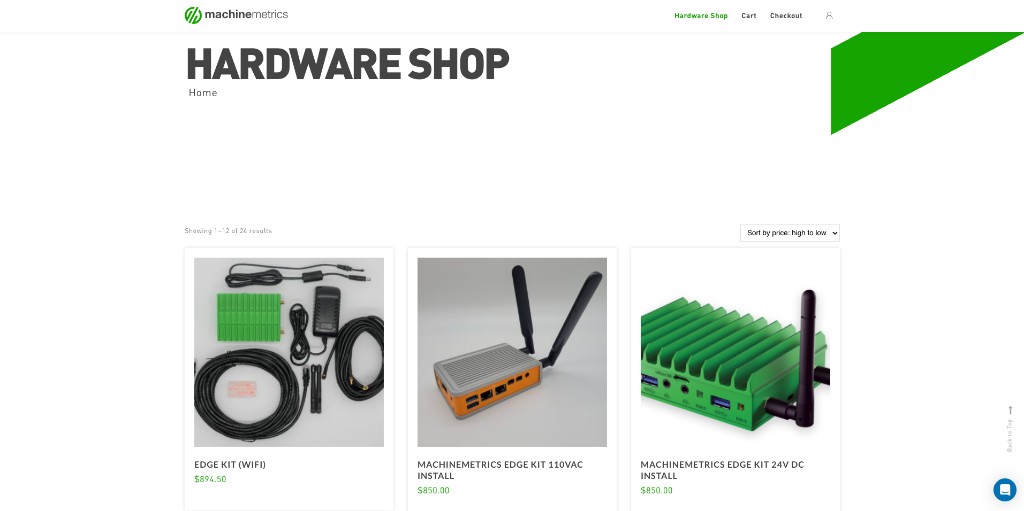
MachineMetrics provides pre-configured, tested hardware designed specifically for our platform. This guide explains what hardware is available, why you should purchase it from MachineMetrics, and how to complete your order.
Important: All hardware should be purchased directly from MachineMetrics through our official shop at shop.machinemetrics.com. Using MachineMetrics-supplied hardware ensures compatibility, proper configuration, and access to our full support services.
Why Buy Hardware from MachineMetrics?
✓ Pre-Configured and Tested
All hardware from MachineMetrics comes:
- Pre-loaded with software - Edge devices arrive ready to activate
- 1 year warranty - Full warranty coverage included
- Optimized for the platform - Specifications tuned for MachineMetrics performance
- Quality assured - Only hardware that meets our standards
✓ Full Support Coverage
When you purchase from MachineMetrics:
- Warranty included - Hardware covered under MachineMetrics warranty
- Technical support - Our team knows the exact hardware configuration
- Replacement assistance - Fast turnaround on hardware issues
- Remote diagnostics - We can troubleshoot hardware remotely
✓ Simplified Setup
MachineMetrics hardware:
- Arrives ready to use - Minimal configuration required
- Documented thoroughly - Clear setup guides specific to our hardware
- Proven compatibility - No guesswork about whether it will work
- Consistent experience - Same hardware across all your installations
✓ Cost-Effective
While you can source hardware independently:
- Our prices are competitive with commercial hardware
- You avoid the cost of testing and troubleshooting incompatible hardware
- Reduced setup time means faster time to value
- Warranty and support are included in the price
⚠️ Important: Use MachineMetrics Hardware
We strongly recommend purchasing all hardware from MachineMetrics. While it's technically possible to provision your own hardware, doing so:
- Requires significant technical expertise
- May void certain support agreements
- Can lead to compatibility issues
- Results in longer setup times and troubleshooting
For the best experience, purchase hardware directly from shop.machinemetrics.com
Available Hardware
Edge Devices
MachineMetrics Edge Device (Intel NUC-based)
The Edge device is the core hardware component that connects your machines to the MachineMetrics cloud.
Specifications:
- Intel processor (specific model varies by current generation)
- 8GB RAM (minimum 4GB)
- 128GB SSD storage (minimum 64GB)
- Dual Gigabit Ethernet ports
- WiFi capable
- Pre-loaded with MachineMetrics Edge software
Includes:
- Edge device unit
- Power adapter
- Quick start guide
- Activation instructions
When to order:
- One Edge device per facility or network segment
- Can support multiple machines (typically 10-20 machines per Edge)
- Required for all machine connectivity
Connectivity Hardware
Machine Connectivity Adapters
Depending on your machines, you may need additional connectivity hardware:
Digital I/O Modules:
- SeaLevel 170 I/O devices
- Sensor interfaces
- Wiring and cables
Serial-to-Ethernet Converters:
- For legacy machines with serial connections
- Pre-configured for MachineMetrics use
Network Switches:
- Industrial-grade Ethernet switches
- For machine network segmentation
- PoE (Power over Ethernet) options
Protocol-Specific Hardware:
- OPC-UA adapters
- MTConnect agents (hardware-based)
- IO-Link masters
When to order:
- Depends on your specific machines and protocols
- Consult with your MachineMetrics solutions engineer
- Often ordered as part of initial deployment package
Accessories & Mounting
Additional Items Available:
Power and Connectivity:
- Extra power adapters
- Ethernet cables (various lengths)
- Cable management solutions
Mounting Hardware:
- Edge device mounting brackets
- VESA mount adapters
Replacement Parts:
- Replacement charging cables
- Power supplies
- Ethernet adapters
How to Purchase
Access the MachineMetrics Shop
Shop URL: https://shop.machinemetrics.com
- Navigate to the MachineMetrics Shop
- You may need to log in with your MachineMetrics credentials
- Browse available products and configurations
Note: The shop is available to current MachineMetrics customers. If you don't have access, contact your Solution Delivery Manager (SDM) or sales@machinemetrics.com
Browse and Select Products
-
Review product catalog
- Edge Devices
- Connectivity hardware
- Cables and mounting
-
Select quantities
- Calculate based on your deployment plan
- Consider buying spares for critical hardware
-
Choose configurations
- Some products have multiple options (mounting types, cable lengths, etc.)
- Select the configuration that matches your needs
-
Add to cart
- Review selections
- Verify quantities and configurations
Place an Order
For most hardware purchases:
-
Complete your cart with all needed items
-
Submit your order through the shop
-
Provide required information:
- Company name and billing address
- Shipping address (if different)
- Contact information
- PO number (if available)
- Requested delivery date
- IP addresses if devices need to be pre-configured
-
Review the order confirmation sent by MachineMetrics
- Verify items, quantities, and pricing
- Check shipping costs and estimated delivery
- Confirm lead times
-
Provide payment or purchase order to proceed with your order
Alternative: Contact your Solution Delivery Manager (SDM) directly to discuss your hardware needs and place a customized order.
Payment Requirements
⚠️ IMPORTANT: MachineMetrics cannot ship hardware without payment or a valid purchase order.
Payment Options:
Option 1: Purchase Order (PO)
- Provide a valid PO from your company
- PO must include:
- All line items from the quote
- Correct shipping address
- Authorized signature (if required by your company)
- Payment terms (Net 30, Net 60, etc.)
- MachineMetrics will process your order upon PO receipt
- Invoice will be sent according to agreed payment terms
Option 2: Full Payment (Credit Card/ACH)
- Pay by credit card through the shop (if available)
- ACH payment can be arranged
- Payment must clear before hardware ships
- Receipt and invoice provided immediately
Option 3: Net Terms (Approved Customers)
- Available to customers with approved credit terms
- Must be set up in advance with MachineMetrics Finance
- Contact your SDM to apply for net terms
Required Before Shipment
We will NOT ship hardware until we have received:
- ✓ Valid purchase order with authorized signature, OR
- ✓ Full payment via credit card or ACH, OR
- ✓ Approved credit application for net terms customers
No exceptions. This policy ensures:
- Clear mutual agreement on the order
- Proper financial processing
- Accurate order fulfillment
- Timely delivery to the right location
Ordering Process
Step-by-Step Order Flow
1. Initial Planning (Before Ordering)
- Determine hardware needs based on deployment plan
- Consult with your Solution Delivery Manager (SDM) or Solutions Engineer
- Identify number of Edge devices and accessories needed
- Plan delivery timeline
2. Place Order (1-2 business days)
- Access shop.machinemetrics.com
- Add items to cart
- Submit order with all required information (including IP addresses if devices need pre-configuration)
- Receive order confirmation from MachineMetrics
3. Purchase Order / Payment (Customer timeline)
- Review and confirm order details
- Generate purchase order (or arrange payment)
- Provide IP addresses if devices need to be pre-configured
- Submit PO or payment to MachineMetrics
- Await order confirmation
4. Order Processing (2-3 business days after PO/payment received)
- MachineMetrics confirms receipt of PO or payment
- Order enters fulfillment queue
- Hardware is prepared and tested
- Shipping label and tracking created
5. Shipment (Varies by location)
- Hardware ships from MachineMetrics facility
- Tracking information sent via email
- Estimated delivery date provided
6. Delivery
- Receive hardware at specified address
- Inspect package for damage
- Verify contents against packing list
- Report any issues immediately
Typical Lead Times
| Hardware Type | Standard Lead Time | Expedited Available? |
|---|---|---|
| Edge Devices | 5-10 business days | Yes (extra cost) |
| Cables & Accessories | 3-5 business days | Yes |
| Connectivity Hardware | 5-10 business days | Limited availability |
Note: Lead times start AFTER receipt of PO or payment. Expedited shipping available in most cases—contact your SDM for pricing.
Shipping and Delivery
Shipping Methods
Standard Shipping:
- Ground shipping via FedEx or UPS
- 5-7 business days (U.S. domestic)
- Tracking provided
- Included in quote
Expedited Shipping:
- 2-3 day shipping available
- Overnight shipping in some cases
- Additional cost (quoted separately)
- Subject to stock availability
International Shipping:
- Available to select countries
- Lead times vary by destination
- Customs documentation provided
- Customer responsible for duties and taxes
- Shipping arrangements: Provide us with your UPS/FedEx account number for us to ship against, or send us a shipping label, or arrange a pickup with us via the support ticket
- Contact your SDM for international orders
Delivery Requirements
Standard delivery:
- Signature may be required
- Delivered to the address on the PO
- Business hours delivery (residential delivery available)
Special Instructions:
- Note any special delivery requirements on your PO
- Loading dock, specific entrance, security protocols, etc.
- Provide contact phone number for delivery questions
Tracking Your Order
- You'll receive an email with tracking information when hardware ships
- Track your package via the carrier website
- Estimated delivery date provided
- Contact MachineMetrics if you have concerns about delivery timing
Receiving Your Shipment
When hardware arrives:
-
Inspect the package immediately
- Check for visible damage to the box
- Note any damage on the delivery receipt
- Take photos if damage is evident
-
Open and verify contents
- Compare received items to packing list
- Check that all items are included
- Verify quantities
-
Test hardware promptly
- Power on devices within 48 hours
- Verify basic functionality
- Report any issues immediately
-
Report problems within 48 hours
- Reach out to Support or your SDM
- Provide order number and description of issue
- Include photos if hardware is damaged
- Keep all packaging materials
After You Receive Your Hardware
Immediate Next Steps
1. Unpack and Inventory (Day 1)
- Remove all items from packaging
- Check against packing list
- Keep all packaging materials until hardware is verified working
2. Initial Testing (Day 1-2)
- Power on Edge devices
- Check all cables and accessories
3. Begin Setup (Day 2+)
- Follow setup guides for each hardware type:
- Activate Edge devices in your MachineMetrics account
4. Report Any Issues
- Contact support immediately if hardware doesn't work
- Document any problems with photos
- Don't attempt repairs on your own (may void warranty)
Storage Recommendations
If you're not deploying hardware immediately:
Storage Guidelines:
- Store in clean, dry environment
- Keep in original packaging if possible
- Avoid extreme temperatures (50°F - 90°F ideal)
- Don't stack heavy items on boxes
- Store in secure location
Shelf Life:
- Edge devices: Can be stored 6-12 months
- Cables/accessories: Indefinite if stored properly
Hardware Support and Warranty
Warranty Coverage
Standard Warranty:
- 1-year limited hardware warranty (from date of shipment)
- Covers manufacturing defects
- Covers hardware failures under normal use
- Does NOT cover physical damage, abuse, or unauthorized modifications
What's Covered:
- Defective components
- Hardware failures
- Pre-loaded software issues
- Activation problems
What's NOT Covered:
- Physical damage (drops, liquid damage, etc.)
- Normal wear and tear
- Modifications or unauthorized repairs
- Loss or theft
- Damage from improper power or environment
Warranty Claims
To file a warranty claim:
-
Contact MachineMetrics Support
- Reach out to Support or your SDM with the subject "Hardware Warranty Claim - [Item]"
-
Provide required information:
- Order number or serial number
- Description of the problem
- When the problem started
- Troubleshooting steps already attempted
- Photos or videos if applicable
-
Work with support to diagnose
- Support may request additional information
- Remote diagnostics will be attempted first
- Troubleshooting steps may be required
-
Replacement or repair determination
- If covered, MachineMetrics will issue RMA (Return Merchandise Authorization)
- Replacement unit shipped (if available)
- Or repair instructions provided
Return Process
If hardware needs to be returned:
- Obtain RMA number from support (required)
- Pack hardware securely in original packaging (preferred)
- Include RMA number inside package and on shipping label
- Ship to address provided by support
- Track your return shipment
- Replacement will be shipped once return is received (or cross-shipped in some cases)
Note: Returns without RMA numbers may be refused or delayed.
Extended Warranty
Contact your Solution Delivery Manager (SDM) to inquire about:
- Extended warranty options
- Advanced replacement programs
- On-site support agreements
Frequently Asked Questions
Q: Can I use my own hardware instead of buying from MachineMetrics?
A: While technically possible, we strongly recommend purchasing from MachineMetrics. Our hardware is pre-configured, tested, and fully supported. Using third-party hardware may result in compatibility issues, longer setup times, and limited support.
Q: What if I need hardware urgently?
A: Contact your Solution Delivery Manager (SDM) immediately. Expedited shipping is available for most items. In some cases, we may have hardware available for same-day or next-day shipment (with expedited shipping costs).
Q: Can I return hardware if I ordered too much?
A: Returns are evaluated on a case-by-case basis. Contact your SDM within 30 days of delivery. Unopened hardware in original packaging may be eligible for return (subject to restocking fee). Opened or activated hardware is generally not returnable except for warranty issues.
Q: Do you offer discounts for bulk orders?
A: Yes. Customers deploying at scale often receive volume discounts. Contact your SDM or sales@machinemetrics.com to discuss pricing for large orders.
Q: What payment methods do you accept?
A: We accept:
- Purchase orders (approved customers)
- Credit card (Visa, MasterCard, Amex)
- ACH/wire transfer
- Net terms (approved customers)
Q: Can hardware be shipped internationally?
A: Yes, to select countries. International orders require additional lead time and documentation. Contact your SDM for international shipping. Customer is responsible for duties, taxes, and customs clearance.
Q: What if hardware is damaged during shipping?
A: Inspect packages immediately upon delivery. Note any damage on the delivery receipt. Reach out to Support or your SDM within 48 hours with photos. MachineMetrics will work with the carrier to file a claim and send replacement hardware.
Q: Can I pick up hardware at your facility?
A: In most cases, no. Hardware ships from our fulfillment centers. Special arrangements may be possible for local customers—contact your SDM.
Q: Do I need to order hardware for every machine?
A: No. One Edge device typically supports 10-20 machines. Your solutions engineer will help size your hardware needs appropriately.
Q: Can I add hardware to an existing order?
A: If your order hasn't shipped yet, contact your SDM immediately to add items. Once shipped, you'll need to place a new order for additional hardware.
Q: How do I know which connectivity hardware I need?
A: Your MachineMetrics solutions engineer will assess your machines and recommend appropriate connectivity hardware during the planning phase. Always consult with your SDM before ordering connectivity-specific hardware.
Q: What if I lose my power adapter or cable?
A: Replacement accessories can be ordered through shop.machinemetrics.com. In some cases, standard commercial equivalents may work (contact support for compatibility before purchasing elsewhere).
Getting Help
Hardware Ordering Questions
Before ordering:
- Solution Delivery Manager (SDM) - Hardware recommendations, sizing, pricing
- Sales Team - sales@machinemetrics.com - New customer orders
- Support - reach out to Support or your SDM - Technical specifications
- Accounting - accounting@machinemetrics.com - Payment options
During ordering:
- Orders - orders@machinemetrics.com - Website or cart issues
- Accounting - accounting@machinemetrics.com - Payment or PO questions
- Your SDM - Order status, customization requests
After ordering:
- Order Status - Contact your SDM or orders@machinemetrics.com
- Shipping Questions - Use tracking number or contact orders@machinemetrics.com
- Delivery Issues - reach out to Support or your SDM with order number
Hardware Setup Questions
Once you receive hardware, use these resources:
- Edge Device Setup Guide
- Quick Start Checklist
- Support: reach out to Support or your SDM
Summary: Key Points
✓ Purchase hardware from MachineMetrics at shop.machinemetrics.com
✓ Provide a valid purchase order OR full payment - we cannot ship without one
✓ Allow proper lead times - typically 5-14 business days after PO/payment
✓ Inspect hardware immediately upon receipt and report issues within 48 hours
✓ Follow setup guides to deploy hardware quickly and correctly
✓ Contact support if you have any issues with hardware
Ready to order? Visit shop.machinemetrics.com or contact your Solution Delivery Manager (SDM).
Need help planning your hardware deployment? Contact your SDM or email sales@machinemetrics.com.
Questions about setup? See the Quick Start Checklist for complete deployment guidance.