Network Requirements
This document outlines all network requirements for MachineMetrics deployment, including firewall rules, required ports, domains, bandwidth, and network architecture options.
Overview
MachineMetrics Edge devices require:
- Internet connectivity — to communicate with MachineMetrics cloud
- Machine network access — to collect data from your equipment
All communication is edge-initiated outbound. There are no inbound firewall requirements.
Network Architecture Options
The MachineMetrics Edge device has two network interfaces (NICs) that can be configured for various network topologies.
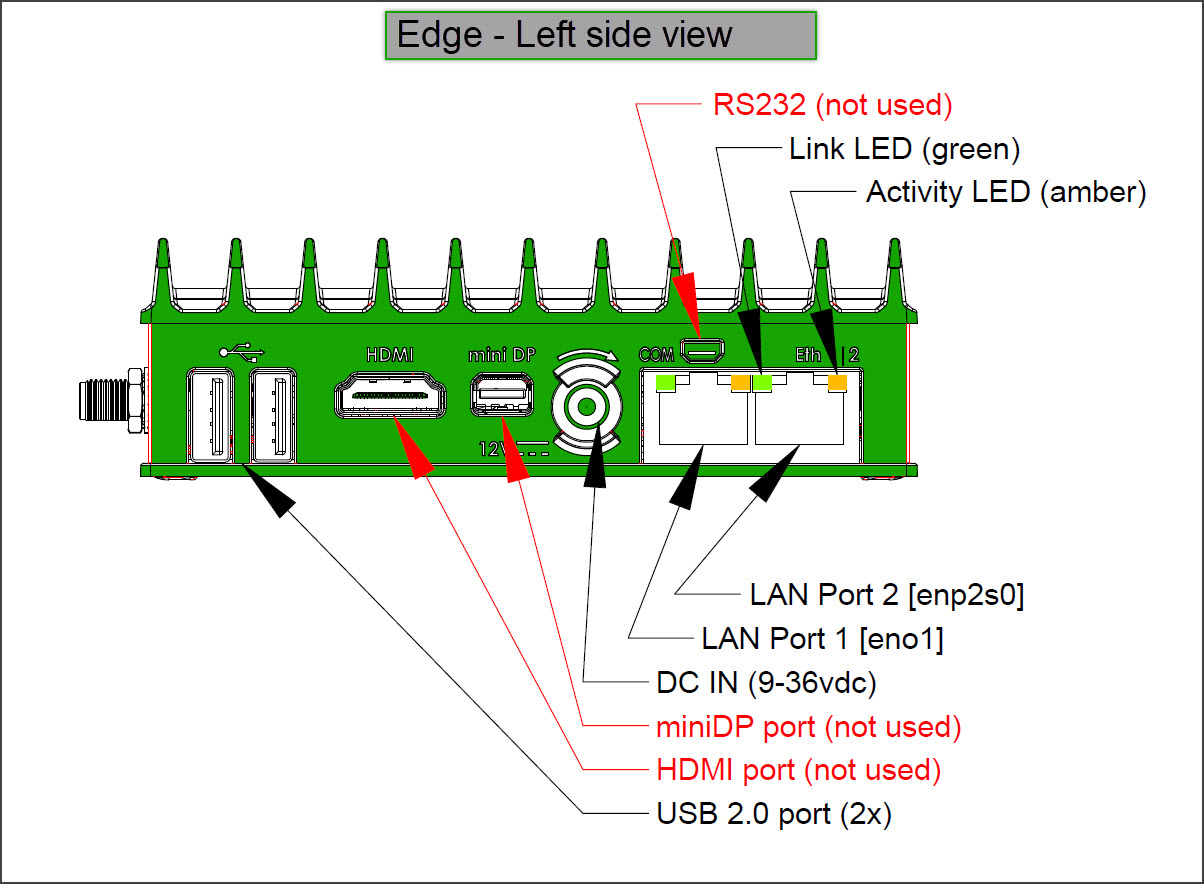
MachineMetrics Edge Device showing dual Ethernet ports (LAN Port 1 and LAN Port 2) and other connectivity options. The dual-NIC design enables secure network isolation between machine networks and corporate/internet networks.
Edge Network Interface Configuration
| Interface | Purpose | IP Configuration | Typical Use |
|---|---|---|---|
| LAN Port 1 (eno1) | Machine Network | Static IP required | Connect to machines via switch/VLAN |
| LAN Port 2 (enp2s0) | Company/Internet Network | DHCP or Static | Connect to corporate network or internet |
Important: The machine network interface (LAN Port 1) must use a static IP address to ensure consistent connectivity to machines. The company network interface (LAN Port 2) can use DHCP when network isolation is configured.
Option 1: Company Network (Single Interface)
Best for facilities with a single converged network where machines and internet are on the same network.
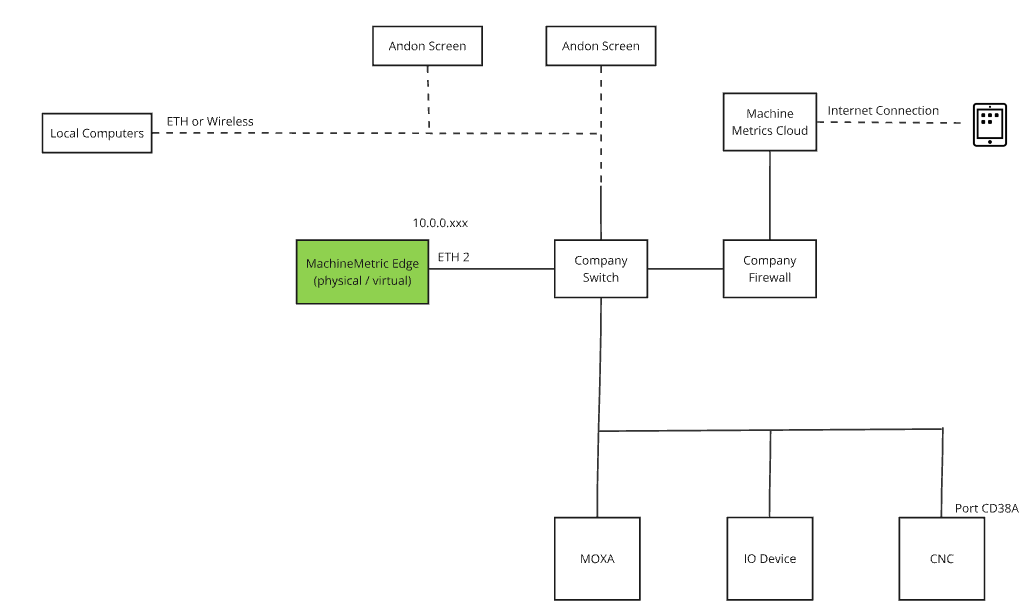
Configuration:
- Single Ethernet connection to company network
- Edge device uses DHCP or static IP
- Machines and internet accessible on same network
Requirements:
- Network drops (CAT5/CAT6) at each machine
- Firewall allows outbound ports 443, 7422, 53, 123
Option 2: Isolated Networks (Dual Interface - Recommended)
Best for maximum security - keeps machine network completely isolated from corporate network and internet.
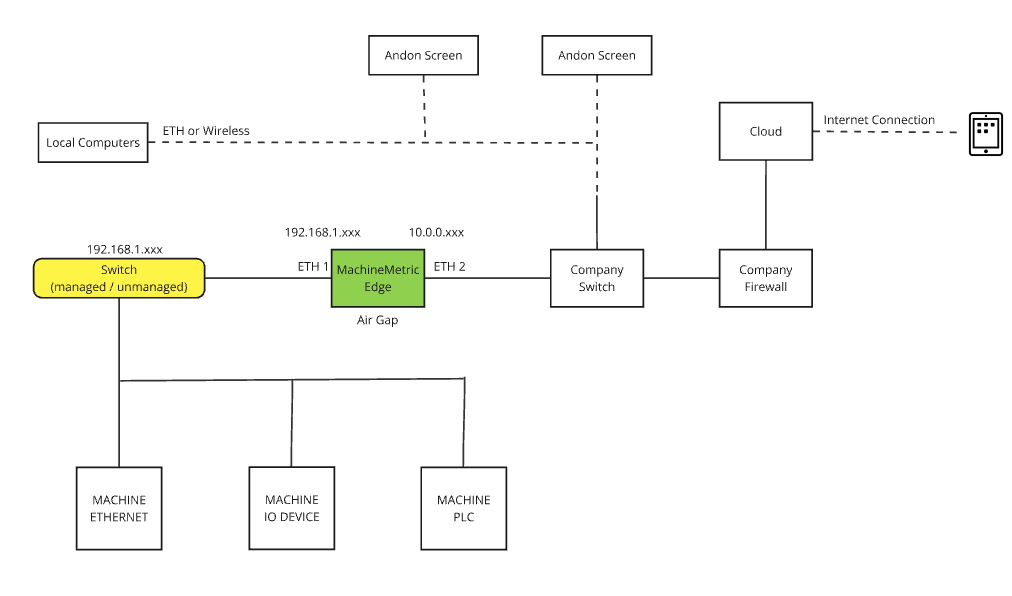
Configuration:
- LAN Port 1 (eno1): Connected to isolated machine network (static IP required)
- LAN Port 2 (enp2s0): Connected to company network with internet access (DHCP or static)
- Machines have no internet access
- Edge acts as secure bridge
Benefits:
- Machines stay isolated from internet (zero attack surface)
- Reduced cybersecurity risk for OT equipment
- Edge device provides secure data conduit
- Compliant with OT security best practices
Requirements:
- Two network connections at Edge location
- Machine network switch/VLAN (no internet access)
- Company network connection with internet access
Option 3: Wireless LAN
Best for flexibility when running Ethernet cables to machines is impractical, but corporate WiFi is available.
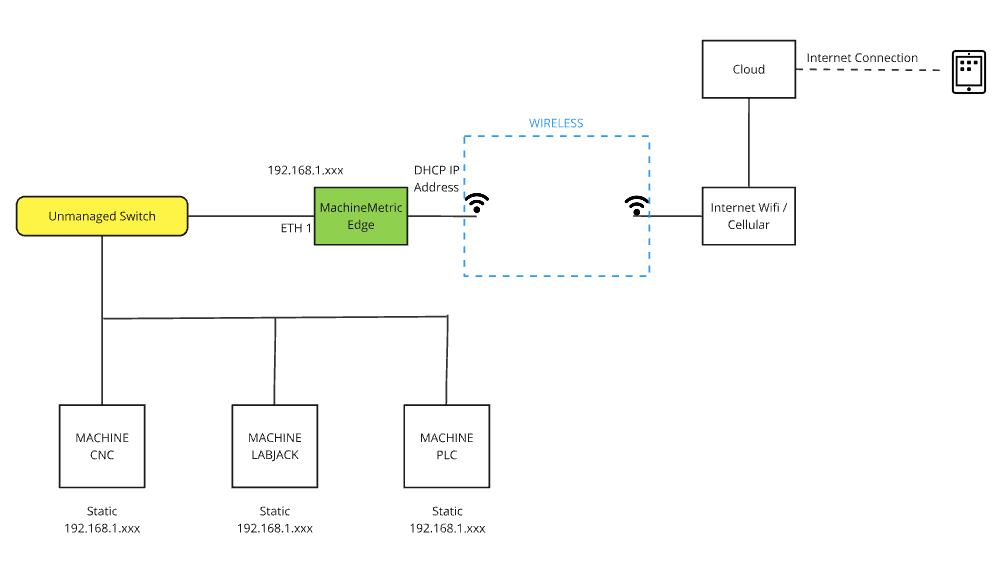
Configuration:
- Machines connect via Ethernet to Edge device
- Edge connects to corporate network via WiFi
- Single wireless connection provides internet access
Requirements:
- WiFi-enabled Edge device
- Reliable WiFi coverage on shop floor
- WPA2/WPA3 encrypted wireless network
Option 4: Fully Wireless
Best for flexibility when WiFi is available but running Ethernet cables to each machine is impractical. The Edge device acts as a wireless bridge.
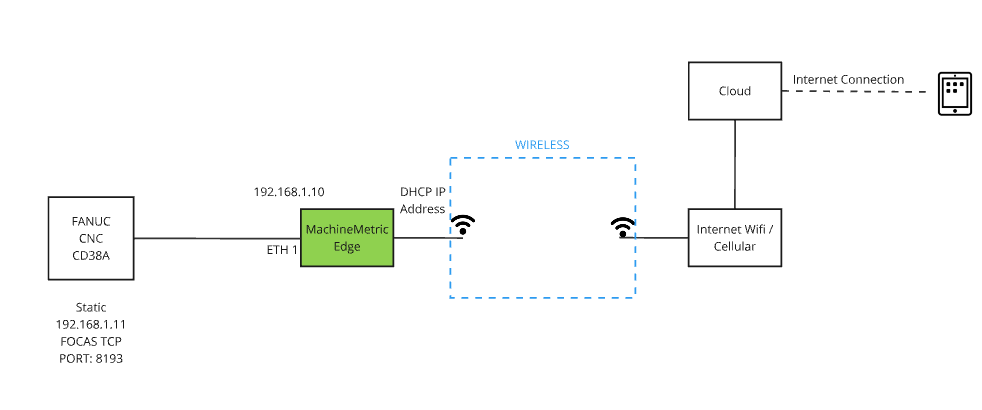
Configuration:
- Machines connect to Edge via standard Ethernet (wired LAN devices)
- Edge device connects to corporate WiFi network
- Edge acts as wireless bridge between wired machines and WiFi network
Requirements:
- WiFi-enabled Edge device
- Standard Ethernet connectivity from machines to Edge
- Strong WiFi signal at Edge location
- WPA2/WPA3 encrypted wireless network
Note: No wireless I/O modules required. Machines use standard Ethernet connections to the Edge, and the Edge provides the wireless connectivity to the network.
Option 5: Cellular Network
⚠️ Use at your own risk - least preferred option
Best for remote locations without reliable internet, but comes with limitations and risks.
Configuration:
- Edge device connects via cellular modem
- Machines connect to Edge via Ethernet
- No dependency on corporate network
Requirements:
- Cellular modem (e.g., Cradlepoint)
- Cellular data plan with sufficient bandwidth
- Good cellular signal strength
Limitations & Risks:
- Higher latency than wired connections
- Variable bandwidth and reliability
- Potential data caps and overage charges
- Signal interruptions can cause data gaps
- No MachineMetrics support for cellular connectivity issues
- Customer responsible for cellular infrastructure
Important: Cellular connectivity is not officially supported by MachineMetrics. Use only when no other network option is available, and understand that connectivity issues related to cellular networks are the customer's responsibility.
Firewall Requirements
Required Outbound Ports
| Port | Protocol | Description |
|---|---|---|
| 53 | UDP | DNS resolution |
| 123 | UDP | Network Time Protocol (NTP) |
| 443 | TCP | HTTPS — all cloud communication |
| 7422 | TCP | NATS — tool monitoring and Edge health |
Required Domains (Standard Cloud)
| Domain | Purpose |
|---|---|
api.machinemetrics.com | API communication |
app.machinemetrics.com | Web application |
*.balena-cloud.com | Software updates |
cloudlink.balena-cloud.com | Remote diagnostics, OS updates |
notify.bugsnag.com | Error reporting |
mm-adapter-store.s3.us-west-2.amazonaws.com | Adapter scripts |
mm-edge-uploads.s3.us-west-2.amazonaws.com | Data uploads |
machinemetrics-deploy.s3.us-west-2.amazonaws.com | Deployment artifacts |
machinemetrics-public.s3.us-west-2.amazonaws.com | Public resources |
352302322568.dkr.ecr.us-west-2.amazonaws.com | Container updates |
prod-us-west-2-starport-layer-bucket.s3.us-west-2.amazonaws.com | Container layers |
Required Domains (GovCloud)
| Domain | Purpose | Static IPs |
|---|---|---|
api.machinemetrics-us-gov.com | API communication | 18.252.129.108, 18.254.70.116, 182.30.131.220 |
app.machinemetrics-us-gov.com | Web application | — |
stream.machinemetrics-us-gov.com:7422 | NATS | See NATS IPs below |
api.balena.machinemetrics-us-gov.com | Updates | 18.253.182.20 |
ca.balena.machinemetrics-us-gov.com | Updates | 18.253.182.20 |
cloudlink.balena.machinemetrics-us-gov.com | Diagnostics | 18.253.182.20 |
logs.balena.machinemetrics-us-gov.com | Updates | 18.253.182.20 |
ocsp.balena.machinemetrics-us-gov.com | Updates | 18.253.182.20 |
registry2.balena.machinemetrics-us-gov.com | Updates | 18.253.182.20 |
s3.balena.machinemetrics-us-gov.com | Updates | 18.253.182.20 |
tunnel.balena.machinemetrics-us-gov.com | Updates | 18.253.182.20 |
machinemetrics-adapter-store.s3.us-gov-east-1.amazonaws.com | Adapters | — |
machinemetrics-govcloud-edge-uploads.s3.us-gov-east-1.amazonaws.com | Uploads | — |
machinemetrics-deploy.s3.us-gov-east-1.amazonaws.com | Deployment | — |
machinemetrics-govcloud-public.s3.us-gov-east-1.amazonaws.com | Public | — |
139811071765.dkr.ecr.us-gov-east-1.amazonaws.com | Containers | — |
NATS IP Addresses
NATS is used for tool monitoring and Edge health telemetry on port 7422.
Standard Cloud
- 54.218.103.126
- 52.24.16.63
- 52.34.161.223
- 35.155.82.103
GovCloud
- 18.252.129.108
- 18.254.70.116
- 182.30.131.220
DNS Configuration
The Edge device uses Google DNS by default:
- Primary:
8.8.8.8 - Secondary:
8.8.4.4
DNS can be overridden via:
- DHCP configuration
- Static configuration in Edge management
If Google DNS is blocked, the Edge falls back to configured DNS servers.
NTP Configuration
The Edge synchronizes time using the pool.ntp.org fleet:
*.resinio.pool.ntp.org
Internal NTP servers can be specified via DHCP if required.
Note: IP-based filtering is not possible for NTP due to the distributed nature of public NTP pools.
Machine Protocol Ports
If a firewall exists between the Edge device and machines, allow outbound access from the Edge to these ports:
| Protocol / Controller | Port |
|---|---|
| Allen Bradley (EtherNet/IP) | 44818 |
| FANUC FOCAS | 8193 |
| MTConnect Adapter | 7878 |
| MTConnect Agent | 5000 |
| Haas Serial (via Moxa) | 4001 |
| Haas MTConnect | 8082 |
| Citizen M700 | 683 |
| Mitsubishi | 683 |
| Heidenhain | 19000 |
| Siemens OPC-UA | 4840 |
| Kepware OPC-UA | 49320 |
| Bystronic OPC-UA | 56000 |
| Fanuc Robot OPC-UA | 4880 |
| Modbus TCP / SeaLevel | 502 |
Bandwidth Requirements
MachineMetrics has minimal bandwidth requirements:
Upload (Edge to Cloud)
| Machine Type | Bandwidth |
|---|---|
| Standard machine | ~1 kbps |
| High-data machine (FANUC FOCAS) | ~5 kbps |
Download (Cloud to Browser)
| View | Bandwidth |
|---|---|
| Dashboard | ~250 bps per machine |
| Workcenter View | ~2 kbps (assumes 1 part/min) |
Example: A facility with 50 machines needs approximately:
- Upload: 50-250 kbps
- Download: 12.5-100 kbps
Deep Packet Inspection (DPI)
Deep packet inspection must NOT be applied to traffic between the Edge device and MachineMetrics cloud.
Exempt the following from DPI:
- All MachineMetrics domains
- All Balena domains
- S3 endpoints
- NATS services
- All encrypted HTTPS traffic
If DPI is enabled (Palo Alto, Fortinet, Cisco, etc.), create bypass rules for Edge traffic.
Proxy Configuration
If your network requires a proxy:
- Configure proxy settings during Edge device activation
- Or update via the Edge management interface
The Edge supports HTTP/HTTPS proxy with optional authentication.
Troubleshooting
Edge Device Not Connecting
- Verify internet connectivity from the Edge location
- Check that required ports (443, 7422) are open
- Confirm required domains are accessible
- Check for DPI interference
- Verify DNS resolution is working
Machines Not Reporting Data
- Verify local network connectivity between Edge and machines
- Check machine protocol ports are accessible
- Confirm machine IP addresses are correct in MachineMetrics
- Check for VLAN or switch configuration issues
Intermittent Connectivity
- Check for network congestion
- Verify WiFi signal strength (if wireless)
- Review firewall logs for blocked traffic
- Check NTP synchronization
Network Checklist
Before deployment, verify:
- Outbound ports 53, 123, 443, 7422 are open
- Required domains are accessible (or whitelisted)
- DPI is disabled for MachineMetrics traffic
- Machine network is accessible from Edge device location
- Bandwidth is sufficient for number of machines
- DNS resolution is working
- NTP synchronization is available
Related Articles
- Security Overview — Certifications, compliance, authentication
- Data Handling & Privacy — Edge security, data retention